
Skip to content
View in the app

A better way to browse. Learn more.

Ford Owners Club - Ford Forums

A full-screen app on your home screen with push notifications, badges and more.

To install this app on iOS and iPadOS
  1. Tap the Share icon in Safari
  2. Scroll the menu and tap Add to Home Screen.
  3. Tap Add in the top-right corner.
To install this app on Android
  1. Tap the 3-dot menu (⋮) in the top-right corner of the browser.
  2. Tap Add to Home screen or Install app.
  3. Confirm by tapping Install.


Join the Independent Ford Owners' Club

Our community has been built by enthusiasts, for enthusiasts, and proudly run by Ford owners' for over 18 years. As an independent, non-official club, everything you’ll find here, advice, support, and opinions, comes directly from members with genuine Ford ownership experience.

Join our friendly community... it's Free!


Will I Keep My Mileage If I Replace Dashboard?
Featured Replies

My instrument cluster digital display is loosing its digits that make up the numbers and the reset button doesnt work.

and it doesnt clock any miles on the mileage trip count (the cars mileage is ok and adds up)

Can i just buy another instrument cluster from same year car, will it show my current correct mileage or will it show the mileage from the car the old instrument cluster is from (ie car from scrapyard)

Dont know if my cars mileage is stored on the instrument cluster its self or somewhere else on the car ?

Thanks

Rich

:)


It will show the mileage from the new cluster, NOT yours. You basically have 2 options,,, option 1.... Pay to have the correct mileage put onto the replacement cluster, various companies will do this.

Option 2... Keep the mileage on the replacement as it us, but you must make a note of when they were changed and what the mileage was originally. It would technically be an offence to sell the car on without this information, especially if the mileage was showing less than the car has done. And these things are all present on MOT's these days.

  • Author

Thanks Mike77, your a star !

Mike is spot on.

If you sold the car and didn't notify the new owner of the change to the mileage then it would be mis-representation and you could be prosecuted.

Keep any receipts for purchasing a replacement cluster and it may also be a good idea to notify DVLA just to be safe.

I don't think it works with the mk1 focus, but I know with the mk2, you can use ELM to increase the mileage.

You can only increase though, so say you bought a cluster from a car that had done less miles than you, you could use ELM to increase the miles to what you have actually done.

You can't get a cluster from a car that's done more miles though and decrease it to what you've actually done.

But like I said I don't think ELM works with the mk1

Like Mike said you can pay to have it corrected or note it down, if you sold the car on without saying then it's fraud cause you'd be claiming to have done less miles than you really have.

The specific charge would be fraud by mis-representation also generally termed 'clocking'.

As I said before, keep receipts and all details of mileage and inform DVLA then you're covered.

  • Author

Sorry but what is "use ELM to increase the mileage" !!!

I believe my Focus is a MK2 isnt it ?

Cheers Guys

ELM is some clever russion software

If you look on the focus guides section, Preee has written a guide on it and you will find many pages of infornation. It has now also be translated into english and very easy to use.

You connect your car to a laptop using an ELM327 interface cable and use the software to turn on feautures that ford left turn off and would charge around 75quid per option turned on.

You can turn on features such as auto door locking at a certain speed and instant fuel readout so you can see what MPG your getting while driving etc.

More importantly in your case there is an option to increase the mileage on the clocks.

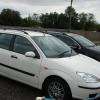
What year is your focus? When I looked at your photo it appeared to be a mk1.

The mk system isn't an official ford system as they just go by build year.

If your car isn't late 05-07 it's not a mk2.

I'm not completely sure on mk1 years but i think it's something like

99- early 03 is mk1

late 03 -early 05 is mk1.5 (or 'facelift')

late 05 - early 07 is mk2

late 07 - early 10 is mk2.5 (facelift)

late 10 - present is mk3

But breakers etc get the system completely wrong and go mk1 mk2 mk3 mk4 mk5 which can be very confusing for people who don't know about fords who are trying to buy parts.

If that's your car in the picture , then it's a Mk1.5 as we would say , ELMConfig would not work with your car.

Your cluster is probably suffering from dry joint soldering , some people take these apart and re-solder the inside's , the problem is caused by the crap solder that Ford used on the clusters.

  • Author

ok thanks Preee !

  • 5 years later...

Hi I have a MRK 2.5 (2008 Ford Focus CC) will the ELM327 interface cable work with the software on my car? Also what part of the guide do I need to follow in order to update the mileage (do I need to re-wire pins?) Is there a better option?

On 11/17/2012 at 11:07 PM, Richardhart90 said:

My instrument cluster digital display is loosing its digits that make up the numbers and the reset button doesnt work.

and it doesnt clock any miles on the mileage trip count (the cars mileage is ok and adds up)

Can i just buy another instrument cluster from same year car, will it show my current correct mileage or will it show the mileage from the car the old instrument cluster is from (ie car from scrapyard)

Dont know if my cars mileage is stored on the instrument cluster its self or somewhere else on the car ?

Thanks

Rich

🙂

when you get another set try just changing the glass bit the shows the info .when i had a problem like this its what i did and it worked ok

Latest Deals

Ford UK Shop for genuine Ford parts & accessories

Disclaimer: As the club is an eBay Partner, The club may be compensated if you make a purchase via the club

Join the conversation

You can post now and register later. If you have an account, sign in now to post with your account.

Guest
Reply to this topic...

The "Digestive"


Background Picker
Customize Layout

Account

Navigation

Search

Search

Configure browser push notifications

Chrome (Android)
  1. Tap the lock icon next to the address bar.
  2. Tap Permissions → Notifications.
  3. Adjust your preference.
Chrome (Desktop)
  1. Click the padlock icon in the address bar.
  2. Select Site settings.
  3. Find Notifications and adjust your preference.

