
Skip to content
View in the app

A better way to browse. Learn more.

Ford Owners Club - Ford Forums

A full-screen app on your home screen with push notifications, badges and more.

To install this app on iOS and iPadOS
  1. Tap the Share icon in Safari
  2. Scroll the menu and tap Add to Home Screen.
  3. Tap Add in the top-right corner.
To install this app on Android
  1. Tap the 3-dot menu (⋮) in the top-right corner of the browser.
  2. Tap Add to Home screen or Install app.
  3. Confirm by tapping Install.


Join the Independent Ford Owners' Club

Our community has been built by enthusiasts, for enthusiasts, and proudly run by Ford owners' for over 18 years. As an independent, non-official club, everything you’ll find here, advice, support, and opinions, comes directly from members with genuine Ford ownership experience.

Join our friendly community... it's Free!


Should the Engine Fan engage with AC on?
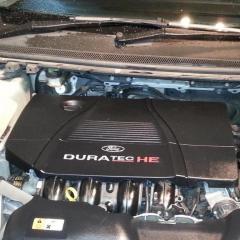
Featured Replies

Hi all

As above. 2010 Focus Zetec 1.8 Petrol.

My air con works, although it does take it up to 90 seconds to actually get cold, especially if the weather is hot like today.

I hit the switch, and within a second or two I can hear the compressor clutch kick in.

My question is this: should the engine fan engage?

Thanks in advance.


mine does so yes 👍

Yes it should.  It will still work without the fan, but won't be at max efficiency so won't be as cold as it should be.

Does the fan come on in traffic?  I'd be worried about the engine overheating in the current weather if not.

  • Author

Good question re: traffic idling. I haven't been in much traffic for a couple of months, so don't remember.. ISTR that Forscan runs the fan as part of a test so I'll give it a shot tomorrow.

Thanks all.

is there not two fans.  the engine fan and the aircon fan. surely only the aircon fan comes on when ac is on.  the engine fan will only come on when the engine requires it to.

The fan (or 2 if it's a twin version) should come on  at reduced speed when ac is turned on, but the resistor pack is often corroded and so you'll only hear the fan(s) when it switches to full speed ('cos the resistor gets bypassed for full speed)  The resistor pack itself either rusts away or the spade connectors corrode and overheat and burn out. 

Screenshot_2020-06-03-08-15-52-143_com.android.chrome.jpg

  • Author

Thanks Nicam, I'll take a look. Could you tell me where that resistor pack in your photo is located? Cheers.

1 hour ago, michaelburrows said:

is there not two fans.  the engine fan and the aircon fan. surely only the aircon fan comes on when ac is on.  the engine fan will only come on when the engine requires it to.

There's only one fan on these.  But it's two speed as Nicam says above.  

The fan control module is on the back of the fan cowling next to the motor, it's no longer a simple resistor in a box.

Hi, it's mounted on the fan tray.  That resistor is for a mk3 Focus.  I see Tom says it's a different design on yours tho'

37 minutes ago, nicam49 said:

Hi, it's mounted on the fan tray.  That resistor is for a mk3 Focus.  I see Tom says it's a different design on yours tho'

That's a Mk1 fan resistor btw.  That design was phased out for engine fans in the 00's, they're all controlled by modules these days.

The MK3 & Mk7 Fiesta use an even more modern design than the Mk2 does.


  • Author

Thanks for the replies everyone.

I ran the FORScan Key on Engine Running Test, an sure enough the fan kicks in at full tilt. After I disconnected, I turned on the A/C and the fan didn't engage. A very quick tap on the fan blades with a very long screwdriver saw it start to move and gradually speed up. 

The fan seems a bit stiff when the engine is off and you give it a push, so I think I'll get another one and see what it's like.


Many thanks one and all for your helpful contributions.

Latest Deals

Ford UK Shop for genuine Ford parts & accessories

Disclaimer: As the club is an eBay Partner, The club may be compensated if you make a purchase via the club

Join the conversation

You can post now and register later. If you have an account, sign in now to post with your account.

Guest
Reply to this topic...

The "Digestive"


Background Picker
Customize Layout

Account

Navigation

Search

Search

Configure browser push notifications

Chrome (Android)
  1. Tap the lock icon next to the address bar.
  2. Tap Permissions → Notifications.
  3. Adjust your preference.
Chrome (Desktop)
  1. Click the padlock icon in the address bar.
  2. Select Site settings.
  3. Find Notifications and adjust your preference.
