
Skip to content
View in the app

A better way to browse. Learn more.

Ford Owners Club - Ford Forums

A full-screen app on your home screen with push notifications, badges and more.

To install this app on iOS and iPadOS
  1. Tap the Share icon in Safari
  2. Scroll the menu and tap Add to Home Screen.
  3. Tap Add in the top-right corner.
To install this app on Android
  1. Tap the 3-dot menu (⋮) in the top-right corner of the browser.
  2. Tap Add to Home screen or Install app.
  3. Confirm by tapping Install.


Join the Independent Ford Owners' Club

Our community has been built by enthusiasts, for enthusiasts, and proudly run by Ford owners' for over 18 years. As an independent, non-official club, everything you’ll find here, advice, support, and opinions, comes directly from members with genuine Ford ownership experience.

Join our friendly community... it's Free!


2014 Focus Zetec S Stereo/display Upgrade
Featured Replies

Hey,

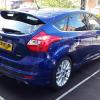
I have a 2014 Ford Focus Zetec S and I really really want to rip out the horrible basic radio fascia and 3.5" Monochrome screen and replace if with the Sony Fascia (non NAV) and the 4.2" Colour display.

My question is all about the functionality of sync though.........

My current display is DM5T-18B955-CG and I have found a 2014 Focus ST-2 for breaking - the stereo parts with the screen is DM5T-18B955-GB. If I do the swap will it just plug and play?

I have been speaking to a Russian guy who sells spare parts but he is telling me that for any change from a 3.5" screen to a 4.2" screen there will be an software update needed?

I have read iNath's post on this (http://www.fordownersclub.com/forums/topic/38649-guide-to-removinginstalling-sony-stereo-mk3-focus-2011/) but he swapped an AM5T monochrome screen to an AM5T colour display and if I am correct, AM5T wasn't sync but just bluetooth? Someone also did the swap in that thread with BM5T screens but I have not seen anything on the web for later 2014 cars with DM5T parts.

I don't want to buy the ST-2 stereo I have my eye on only to find out I will lose some of my Sync functionality. Surely it will just be an easy case of plug and play with everything working?

Appreciate your help guys and girls!!


Basically all Focus MK3 displays (FCDIM) are compatible as long as it is based on the same system. There are differences between the old Bluetooth/Voicecontrol system and the newer SYNC system. The displays and radio units of these systems are not interchangeable. Installing a display of the wrong system will result in loosing functionality like for example SYNC, USB and Voicecontrol.

I changed the stock 3.5 Inch monochrome display for the 5 Inch full color Sat Nav display. On the Focus MK3 the Sat Nav is completely integrated into the display. I found a suitable display at a local scrap yard which was about the same age as my car. My car did already have exactly the same radio unit as the car I got the display from. After I installed the 5 Inch full color Sat Nav display all Sat Nav functions became available.

Afterwards I installed an aftermarket Fakra GPS antenna and an additional Fakra antenna cable between the display and the radio unit (needed for TMC reception) to make the Sat Nav system work. The complete retrofit of the Sat Nav system costed me less than €50,-.

  • Author

Thankyou for your advice Wilco!

So just to clarify......

  • replacing my DM5T 3.5" monochrome screen with a DM5T 4.2" colour screen (with any letters afterwards) should work just fine?
  • would this matter if the 4.2 screen came from a BM5T-18C815-XM head unit but my current head unit is BM5T-18C815-HN or should I swap the HU as well?

I have been advised by my Russian friend to just get the 5" SatNav display as there are no compatibility issues with them - but then I would have the screen/fascia without any SatNav connectivity unless I do what you did - it would annoy me having the Satnav screen without getting it to work!

To be honest I'm not bothered about SatNav, I just want the 4.2" colour screen!

Sorry for all the questions, I just want to make sure I do this right as there might not be the option to return some of the parts once I've purchased them!

As far as I know replacing the current 3.5 Inch monochrome display with the 4.2 full color display should be functioning fine as long as the part number of both displays starts with DM5T.

Personally I would change the radio unit as well. The Sony has a much better sound quality than the normal audio system.

My experience is that the 4.2 Inch full color displays which came with the Sony radio are much rarer than the 5 inch full color display which came with the Sat nav system. The 5 Inch display can also be used without unlocking the Sat nav functions. If the 5 inch display is configured as a 4.2 Inch display it will be fully functional but the Sat Nav functions remain locked. I tested this on my car after I installed the 5 Inch display without all of the other parts needed for the Sat Nav system.

  • Author

Appreciate your help!

I'm going to go for the full display/head unit/sony fascia replacement then - although when you use the word 'configure' it scares me as I have no means of doing any software changes should they be necessary etc :unsure:

Where in gloucestershire are you, ive got software and cable for configuring if you need to borrow it t, or get a cable yourself off ebay.and download free software.

  • Author

Thanks Ian that would be awesome if I need it!!! I'm in Cheltenham but work in Evesham - would definitely buy you a beer for this!!!

No problem I live where you work. Lol

  • 4 months later...

Hi i am looking to do the same to my zetec s 180bhp, which has the basic ford head unit, did all this work for you and did you need to do any updates or was it plug and play

  • Author

Hi,

Nice engine choice! I also have the 180ps version - I know it's no ST but it certainly picks up speed and I love its little throaty roar!!

My switch to the Sony stereo went absolutely fine with no software update - just plug and play but I did my research first!

Firstly, what plate focus do you have? You need to pull the existing screen out and look on the back for the software version its running. So mine was DM5T and by swapping to a 2014 focus ST DM5T screen it caused no issues.

I pick my new car up on Thursday. It's a 12 plate, will I need a new Bluetooth box to fit with it etc

  • Author

You can check if you car comes with bluetooth by sticking in the reg or VIN on fords etis website under the vehicle tab. It will give you a long list of everything the car was fitted with in the factory.

For a 12 plate you are either looking at AM5T or BM5T software. AM5T was earlier as the letter suggests and I don't believe came with bluetooth.

Sadly etis is not always correct - my neighbour has a 63 plate Fiesta Zetec with Bluetooth - yet etis states it hasn't got it for some unknown reason

  • Author

Ok well there ya go!!!

I would stay just wait til you get the car then pop open the stereo and see what it says on the back of the screen. Then you know for sure what you have!

Sadly etis is not always correct - my neighbour has a 63 plate Fiesta Zetec with Bluetooth - yet etis states it hasn't got it for some unknown reason

Thats because it will have snyc which encompasses bluetooth.

12 plate focus zetec s will have bluetooth, sure it was only the style that didnt have bluetooth,

you can usually tell by what steering wheel you have fitted. if its got the paddle on right hand side for phone then its AM5T (older system) if it has the button on the wheel then its BM5T thats the ford sync.

My car defo has Bluetooth connectivity as I tested it when I brought the car. So if I replace the head unit all I need is the Sony fascia and the screen and all should work I'm guessing, won't need another Bluetooth module.

I've seen on eBay some bm5t models

My car defo has Bluetooth connectivity as I tested it when I brought the car. So if I replace the head unit all I need is the Sony fascia and the screen and all should work I'm guessing, won't need another Bluetooth module.

Next to the fascia and the display (FCDIM) you also need the correct dashboard surround panel and the audio unit itself.

If you do not change the audio unit the sound quality will remain the same. Which dashboard surround panel you need depends on the size of the display. Normal Sony radio's have the 4.2 Inch full color display and SatNav Sony radio's have the 5 Inch full color display.

  • Author

Just to add to the above... I don't think it really matters what model number the fascia has as long as it fits the display screen. I went for the 4.2" option as I couldn't be bothered installing the Sat Nav parts and I ended up getting a brand new fascia from a guy who runs the Pro-Ford website in Russia. In my boot I also have a spare 2nd hand sony fascia for the 4.2" display. It has two minor minor little marks on it and needs 2 Torx screws but other than that is in really good condition. If you can get hold of the screen and struggle for the fascia let me know!

Yeah sorry I meant the rear box as well. So if I replaced all the in one it should work

  • Author

Yeah that would work perfectly as long as you already have BM5T in your focus.

That radio though is no way from a 2014 focus otherwise the code would be DM5T like mine is. I caught a few people out on ebay claiming it was newer than it was when I was looking lol

im betting yours will be am5t and not bm5t.

bm5t is for later models with sync.

when you get the car, just pull the radio out, it is easy enough to do, 8 torque screws. 2 for the facia, 2 for the head unit and 4 for the display. take all of 2 mins to get all 3 components out.

Latest Deals

Ford UK Shop for genuine Ford parts & accessories

Disclaimer: As the club is an eBay Partner, The club may be compensated if you make a purchase via the club

Join the conversation

You can post now and register later. If you have an account, sign in now to post with your account.

Guest
Reply to this topic...

The "Digestive"


Background Picker
Customize Layout

Account

Navigation

Search

Search

Configure browser push notifications

Chrome (Android)
  1. Tap the lock icon next to the address bar.
  2. Tap Permissions → Notifications.
  3. Adjust your preference.
Chrome (Desktop)
  1. Click the padlock icon in the address bar.
  2. Select Site settings.
  3. Find Notifications and adjust your preference.
