
Skip to content
View in the app

A better way to browse. Learn more.

Ford Owners Club - Ford Forums

A full-screen app on your home screen with push notifications, badges and more.

To install this app on iOS and iPadOS
  1. Tap the Share icon in Safari
  2. Scroll the menu and tap Add to Home Screen.
  3. Tap Add in the top-right corner.
To install this app on Android
  1. Tap the 3-dot menu (⋮) in the top-right corner of the browser.
  2. Tap Add to Home screen or Install app.
  3. Confirm by tapping Install.


Join the Independent Ford Owners' Club

Our community has been built by enthusiasts, for enthusiasts, and proudly run by Ford owners' for over 18 years. As an independent, non-official club, everything you’ll find here, advice, support, and opinions, comes directly from members with genuine Ford ownership experience.

Join our friendly community... it's Free!
 

NEW MEMBER

Featured Replies

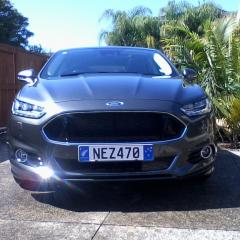
Hello Ford Owners, I'm Grant from Auckland, New Zealand. Six months ago I traded my 2009 Mondeo 2.3L Auto, Petrol Zetec for a new Mondeo Titanium 2.0L, Auto, Petrol, Hatch in Magnetic with 19" wheels and 177KW (240PS). It is a really good car. I have done some mods already and had a retune and Dyno and now have 210KWs and 420NM of torque, 280PS and 310FT-LB on the crankshaft. At the wheels is about 15% less. It has really good power now and drives great. Our models here are different than the UK, EU, and US and now the Titanium (top model) is discontinued here and replaced with the Hybrid. I'm DJ NEZZ from New Zealand.


Hi Welcome

Welcome 

  • Author

Thanks for the welcomes. Here's some photos of my 2019 Mondeo Titanium. My nick name is DJ Nezz because I like House and Drum & base music going back to the mid 90's when it started. You can call me The Kiwi if you like. The Kiwi from Auckland, New Zealand, The Home Of The America's Cup.

Mondeo 1.jpg

Mondeo 2.jpg

Mondeo 3.jpg

Mondeo 4.jpg

Mondeo 5.jpg

Latest Deals

Ford UK Shop for genuine Ford parts & accessories

Disclaimer: As the club is an eBay Partner, The club may be compensated if you make a purchase via the club

Join the conversation

You can post now and register later. If you have an account, sign in now to post with your account.

Guest
Reply to this topic...

The "Digestive"


Background Picker
Customize Layout

Account

Navigation

Search

Search

Configure browser push notifications

Chrome (Android)
  1. Tap the lock icon next to the address bar.
  2. Tap Permissions → Notifications.
  3. Adjust your preference.
Chrome (Desktop)
  1. Click the padlock icon in the address bar.
  2. Select Site settings.
  3. Find Notifications and adjust your preference.
