
Skip to content
View in the app

A better way to browse. Learn more.

Ford Owners Club - Ford Forums

A full-screen app on your home screen with push notifications, badges and more.

To install this app on iOS and iPadOS
  1. Tap the Share icon in Safari
  2. Scroll the menu and tap Add to Home Screen.
  3. Tap Add in the top-right corner.
To install this app on Android
  1. Tap the 3-dot menu (⋮) in the top-right corner of the browser.
  2. Tap Add to Home screen or Install app.
  3. Confirm by tapping Install.


Join the Independent Ford Owners' Club

Our community has been built by enthusiasts, for enthusiasts, and proudly run by Ford owners' for over 18 years. As an independent, non-official club, everything you’ll find here, advice, support, and opinions, comes directly from members with genuine Ford ownership experience.

Join our friendly community... it's Free!


Fit Audio Control To Steering Wheel
Featured Replies

Hi looking to fit after market audio controls to steering wheel on 08 fiesta zetec anyone know how?

Car has never had before and doesnt seem to have connection available can it still be done?


Welcome to the club. Please dont post the same post twice in different sections, if youve posted in the wrong section contact one of the moderators and we will move your original post thanks. I think it is possible 2 minutes and ill have a look about to see what you need

You'll need the following;

http://www.fordpartsuk.com/shop/ford_fiesta_mk6-steering_column_mounted_audio_switch_f_1346664_c_325.htm

http://www.fordpartsuk.com/shop/ford_fiesta_mk6-lower_steering_colum_cowl_with_audio_switch_fitment_f_1329910_c_325.htm

Mk6 fiestas are usually all fitted with the same wiring loom and if something hasnt been fitted the wiring for it is normally still there just hidden/taped up. Remove the steering wheel cowl and have a look look for the connection you should find its somewhere there

  • Author

Thanks, does the cowl just clip off ?

If youl look underneath the steering wheel theres 3 screws

  • Author

Ok thanks I will have a look

  • Author

photo-42286.jpg?_r=1364834013?_r=39d423d

  • Author

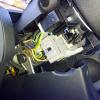
Took off the cover and thats what is underneath, is that got right thing?

Can you see any loose connectors anywhere? It my be set right back into the rear of the steering wheel-follow the wiring back. You also tend to find there will be a connection at the rear of the stereo-again this might be taped up out of the way/not immediately obvious

  • Author

OK i look again, is that the housing for the controls that i can see? just need to find the connection for stereo.

What is the connection that im looking for btw?

See in at the steering column have a looj and see if theres any loose connector plugs not going to anything it might be right up by the one of the two stalks. I cant realy tell from the picture

Moved to New Modification Discussions section :)

  • 2 weeks later...

Hi,

Just done this to my girlfriend's fiesta, te connector I found looks like it is the one I've circled in red on your picture (taped up)

photo-42286.jpg

  • Author

oh excellent thanks i will check it out and let you thanks again

  • 1 year later...

sorry to bring back an old thread back from the grave but if doing this add on do you need a different plastic cover - so technical - I'm looking at adding this to my fiesta mk6.5 but i can't work out what to do with the plastic cover and if its needed..... any help would be appreciated

Latest Deals

Ford UK Shop for genuine Ford parts & accessories

Disclaimer: As the club is an eBay Partner, The club may be compensated if you make a purchase via the club

Join the conversation

You can post now and register later. If you have an account, sign in now to post with your account.

Guest
Reply to this topic...

The "Digestive"


Background Picker
Customize Layout

Account

Navigation

Search

Search

Configure browser push notifications

Chrome (Android)
  1. Tap the lock icon next to the address bar.
  2. Tap Permissions → Notifications.
  3. Adjust your preference.
Chrome (Desktop)
  1. Click the padlock icon in the address bar.
  2. Select Site settings.
  3. Find Notifications and adjust your preference.
