
Skip to content
View in the app

A better way to browse. Learn more.

Ford Owners Club - Ford Forums

A full-screen app on your home screen with push notifications, badges and more.

To install this app on iOS and iPadOS
  1. Tap the Share icon in Safari
  2. Scroll the menu and tap Add to Home Screen.
  3. Tap Add in the top-right corner.
To install this app on Android
  1. Tap the 3-dot menu (⋮) in the top-right corner of the browser.
  2. Tap Add to Home screen or Install app.
  3. Confirm by tapping Install.


Join the Independent Ford Owners' Club

Our community has been built by enthusiasts, for enthusiasts, and proudly run by Ford owners' for over 18 years. As an independent, non-official club, everything you’ll find here, advice, support, and opinions, comes directly from members with genuine Ford ownership experience.

Join our friendly community... it's Free!


Fiesta St (st3) Start/stop Function
Featured Replies

Hello, new to the forum. Just a quick question I would like to ask to help with my sanity.

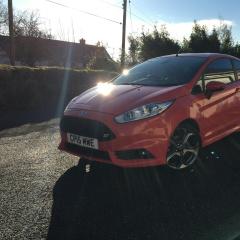
I recently bought myself a lovely new 2015 Fiesta ST-3, 1500+ miles in the first two weeks of ownership, what a fun car!

I've just taken it off to the garage to get the MP215 pack fitted, for some added fun.

While it's in the garage I have asked them to take a look at the Stop/Start function as it seems to have stopped working.

The garage has said to me that they don't believe that an ST comes with Stop/Start, but I could've sworn blind that the

engine was cutting out when I was stopping at traffic lights etc...

I am aware, from reading the manual, that the Stop/Start function will not work in Sport Mode & also it's a bit twitchy relating

to various air-con settings, battery levels et al. (I tried all sorts of permutations & couldn't get it to work again).

My main question is, am I going mad?! Does the ST or ST-3 come with Stop/Start or not? I am convinced I had it working for the

first week or so of ownership, perhaps I'm so used to driving another little 1litre Ecoboost Fiesta that has Stop/Start, that it's thrown

my brain off-kilter.

It seems ridiculously hard to find any information online about the ST having Start/Stop. A few sites mention it, but mostly it

doesn't seem to come up in various searches, most likely because it doesn't have Start/Stop;)

Please help my sanity and settle this matter definitively, once and for all.

Chris

Solved by WXC79


No the ST model doesn't have stop/start, my St-3 certainly doesn't anyways and all the others I know.

  • Author

Thanks, I am just going mad then!

Ah well, they can all have a good laugh at me when I pick up my car tomorrow;)

no fiesta st has the stop/start fitted

  • Author
  • Solution

Cheers. At least I know it's me losing my mind and not the garage trying to cheat me out of fixing it! Newbie indeed;)

Glad to here that you're enjoying the ST3 (and soon to be MP215 - don't tempt me :D).

Don't be worried about the Start/stop blond moment, I forgot that the ST didn't have it after swapping from my Zetec to ST and had a mini whinge in the car with a work colleague who just laughed at me for the rest of the journey home :D

For 100% confirmation just enter your car reg/vin here-

http://www.etis.ford.com/vehicleRegSelector.do;jsessionid=8236E86885479669B52A9473B7431A51.fcvas506

The bit you are looking for in the right hand column is 'with' or 'less' Starter - Stop/Start System

  • Author

Thanks folks, much appreciated.

Latest Deals

Ford UK Shop for genuine Ford parts & accessories

Disclaimer: As the club is an eBay Partner, The club may be compensated if you make a purchase via the club

Join the conversation

You can post now and register later. If you have an account, sign in now to post with your account.

Guest
Reply to this topic...

The "Digestive"


Background Picker
Customize Layout

Account

Navigation

Search

Search

Configure browser push notifications

Chrome (Android)
  1. Tap the lock icon next to the address bar.
  2. Tap Permissions → Notifications.
  3. Adjust your preference.
Chrome (Desktop)
  1. Click the padlock icon in the address bar.
  2. Select Site settings.
  3. Find Notifications and adjust your preference.
