
Skip to content
View in the app

A better way to browse. Learn more.

Ford Owners Club - Ford Forums

A full-screen app on your home screen with push notifications, badges and more.

To install this app on iOS and iPadOS
  1. Tap the Share icon in Safari
  2. Scroll the menu and tap Add to Home Screen.
  3. Tap Add in the top-right corner.
To install this app on Android
  1. Tap the 3-dot menu (⋮) in the top-right corner of the browser.
  2. Tap Add to Home screen or Install app.
  3. Confirm by tapping Install.


Join the Independent Ford Owners' Club

Our community has been built by enthusiasts, for enthusiasts, and proudly run by Ford owners' for over 18 years. As an independent, non-official club, everything you’ll find here, advice, support, and opinions, comes directly from members with genuine Ford ownership experience.

Join our friendly community... it's Free!


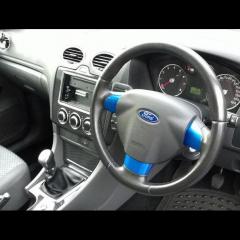
Changing Steering Wheel
Featured Replies

Hi all, can you change a 4 spoke steering wheel to a 3 spoke wheel, or are the fitting different.

Thanks for any help


you can as long it a focus you will need the three spoke air bag or cover

you can as long it a focus you will need the three spoke air bag or cover

i change mine from 3 to 4 spoke so i could get cruses control so just do it other way around but disconnect that battery for 20 mins

before you start working on it and make sure you have your radio code before disconnect the battery.

  • Author

Cheers guys :)

I really want to change from the 4 spoke to the 3 spoke but don't feel comfortable with changing it myself!

got any mates that could do it.If you don.t feel you can do it then leave it alone as you are dealing with the air bag.

yeah i have a mate who could but even he has said that its a bit of a job and wouldn't want to do it ha! was thinking of asking my local garage to do it for me and see how much they'd charge for it

Changing the wheel is on a scale of 3/5 you mess up and you may have airbag faults come up etc.

You basically use a small screw driver and push it into the hole at the left and right side of the airbag. You can do one side first and you may turn the steering wheel to help. At the same time pulling lightly on the airbag on the side you are pushing the metal clip.

Once the airbag is out its eithier modified with new cover or replace the complete airbag. I advise on replace as again you are dealing with what is essentially a bomb.

Straigthen the steering wheel and then take the key out and let the steering lock. Undo the centre bolt. That screw the bolt on about 4 turns, and pull on the steering wheel shake it left to right up down till it comes off. The bolt is there to stop if flying in your face.

Place the new steering wheel on. Tighten the bolt, correct torque. And the reconnect the airbag.

Then push the airbag into the centre of the wheel lining it up.

Forgot to mention you also have the horn cable.

If all is correct no airbag light should be on, and full locked left and right the horn works.

All this must be done with battery disconnected for 30mins. And just before messing with airbag push it to activate horn, it will remove any remaing power and double check battery is disconnected.

All this must be done with battery disconnected for 30mins. And just before messing with airbag push it to activate horn, it will remove any remaing power and double check battery is disconnected.

Very good point indeed.

Always disconnect and discharge fully before tinkering with airbags, they are a ferocious beast when they go off.

(Warning - some swearing involved)

Latest Deals

Ford UK Shop for genuine Ford parts & accessories

Disclaimer: As the club is an eBay Partner, The club may be compensated if you make a purchase via the club

Join the conversation

You can post now and register later. If you have an account, sign in now to post with your account.

Guest
Reply to this topic...

The "Digestive"


Background Picker
Customize Layout

Account

Navigation

Search

Search

Configure browser push notifications

Chrome (Android)
  1. Tap the lock icon next to the address bar.
  2. Tap Permissions → Notifications.
  3. Adjust your preference.
Chrome (Desktop)
  1. Click the padlock icon in the address bar.
  2. Select Site settings.
  3. Find Notifications and adjust your preference.
