
Skip to content
View in the app

A better way to browse. Learn more.

Ford Owners Club - Ford Forums

A full-screen app on your home screen with push notifications, badges and more.

To install this app on iOS and iPadOS
  1. Tap the Share icon in Safari
  2. Scroll the menu and tap Add to Home Screen.
  3. Tap Add in the top-right corner.
To install this app on Android
  1. Tap the 3-dot menu (⋮) in the top-right corner of the browser.
  2. Tap Add to Home screen or Install app.
  3. Confirm by tapping Install.


Join the Independent Ford Owners' Club

Our community has been built by enthusiasts, for enthusiasts, and proudly run by Ford owners' for over 18 years. As an independent, non-official club, everything you’ll find here, advice, support, and opinions, comes directly from members with genuine Ford ownership experience.

Join our friendly community... it's Free!


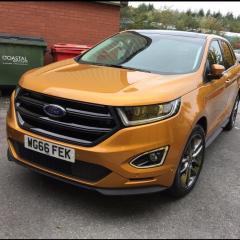
LED headlights
Featured Replies

Hi

Does any one have the LED upgrade? All the literature says it comes with tracer indicators, yet ours doesn't seem to. Is there a setting somewhere for this?


I have led upgrade lights and do you mean indicator led Chase like the new Audi ? Mine don't either ? I would be interested to know what the auto high beam setting lh / rh traffic actually means ? Is the side I am on ? Or incoming traffic ?

Mine has the LED upgrade (adaptive headlights?) 

Maybe it's only the US Edges that have the Audi style indicators? 

Regarding the auto high beam function, I've noticed that the blue light on the dash illuminates for high beam, but the actual beam stays on dipped.

  • Author

The Auto High beam works a treat.

Push the stalk back to put on High beam, - the blue indicator comes on the dash.

When the car sees any other light it automatically dips the headlights or pushes the beam pattern to one side. 

Once back in a dark area the high beams come back on.

Ok cheers that helps - never realised you push the stalk first ? Will try this

On my Focus, just set lights to auto and the dip works when it "sees" any incoming lights. No need for any other settings.

Ok so in settings rh / lh traffic ? What for uk should this be ? 

Havn't got LED headlamps, but on auto lights, high beam function works automatically!!!!

On 30/10/2016 at 9:57 PM, Marcwain said:

Hi

Does any one have the LED upgrade? All the literature says it comes with tracer indicators, yet ours doesn't seem to. Is there a setting somewhere for this?

I'm wondering if the "tracer" indicator means the indicator "traces" the same line as the DRL. (Indicator lights replace the DRL - if that makes sense?)

I've noticed this feature on the latest Range Rovers

So what's lh / rh traffic ? What settings yours on ? Need to know what it's set too for uk ?

Not sure what this feature is?

I really should sit down and read the handbook. 

  • 1 month later...

I got the UK standard fit Halogen headlamps, wish I'd spent a bit more on the HID/LED's though! The high beam is a bit of a mediocre effort and doesn't project as well as my old Kuga MK1.

Does anyone know if the HID/LED headlamp units can be swapped out (i.e. same harness?) and what needs configuring (i.e. GEM) to get them working? UK Part numbers of the headlamps?

Does anyone have a wiring diagram of both standard fit and HID/LED option?

On 02/11/2016 at 6:38 PM, Wickyst said:

So what's lh / rh traffic ? What settings yours on ? Need to know what it's set too for uk ?

You only need to change this when driving on the right in a different country.

Just try both settings and make sure they are aiming more up and left.

Latest Deals

Ford UK Shop for genuine Ford parts & accessories

Disclaimer: As the club is an eBay Partner, The club may be compensated if you make a purchase via the club

Join the conversation

You can post now and register later. If you have an account, sign in now to post with your account.

Guest
Reply to this topic...

The "Digestive"


Background Picker
Customize Layout

Account

Navigation

Search

Search

Configure browser push notifications

Chrome (Android)
  1. Tap the lock icon next to the address bar.
  2. Tap Permissions → Notifications.
  3. Adjust your preference.
Chrome (Desktop)
  1. Click the padlock icon in the address bar.
  2. Select Site settings.
  3. Find Notifications and adjust your preference.
