
Skip to content
View in the app

A better way to browse. Learn more.

Ford Owners Club - Ford Forums

A full-screen app on your home screen with push notifications, badges and more.

To install this app on iOS and iPadOS
  1. Tap the Share icon in Safari
  2. Scroll the menu and tap Add to Home Screen.
  3. Tap Add in the top-right corner.
To install this app on Android
  1. Tap the 3-dot menu (⋮) in the top-right corner of the browser.
  2. Tap Add to Home screen or Install app.
  3. Confirm by tapping Install.


Join the Independent Ford Owners' Club

Our community has been built by enthusiasts, for enthusiasts, and proudly run by Ford owners' for over 18 years. As an independent, non-official club, everything you’ll find here, advice, support, and opinions, comes directly from members with genuine Ford ownership experience.

Join our friendly community... it's Free!
 

3 questions

Featured Replies

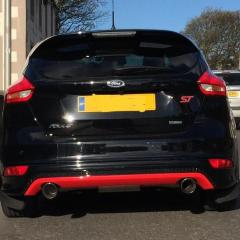
Hi guys 3 questions 1... My new car came with sync 111, MDF TFT Touch Screen With Nav. Then it says Less Navigation Data? What does  this mean? Can I add it. 2.. Black Edition comes with black heater vents at doors. The ones at side of radio have silver in them. Can I get ST 2/3 or Zetec S which Black Edition is vents and put them in place? 3..Dose anyone know why my USB port under touch screen doesn't have power? I've plugged my phone in but doesn't charge? Cheers Jimmy 

PS the pic is a ST2 2016 plate

IMG_0790.JPG


Does the USB read music on your iPhone/other USB devices ok? If so it's probably because that's all it's intended for. For iPhone charging use the power socket elsewhere, with an adapter as necessary

The USB ports are limited to the USB2.0 specification of 500ma. The newer iPhones are probably going to require anywhere up to 1000ma before it will allow charging.

  • Author

Yeh your both right it powers my hard drive. But doesn't charge thanks guys 

Latest Deals

Ford UK Shop for genuine Ford parts & accessories

Disclaimer: As the club is an eBay Partner, The club may be compensated if you make a purchase via the club

Join the conversation

You can post now and register later. If you have an account, sign in now to post with your account.

Guest
Reply to this topic...

The "Digestive"


Background Picker
Customize Layout

Account

Navigation

Search

Search

Configure browser push notifications

Chrome (Android)
  1. Tap the lock icon next to the address bar.
  2. Tap Permissions → Notifications.
  3. Adjust your preference.
Chrome (Desktop)
  1. Click the padlock icon in the address bar.
  2. Select Site settings.
  3. Find Notifications and adjust your preference.
