
Skip to content
View in the app

A better way to browse. Learn more.

Ford Owners Club - Ford Forums

A full-screen app on your home screen with push notifications, badges and more.

To install this app on iOS and iPadOS
  1. Tap the Share icon in Safari
  2. Scroll the menu and tap Add to Home Screen.
  3. Tap Add in the top-right corner.
To install this app on Android
  1. Tap the 3-dot menu (⋮) in the top-right corner of the browser.
  2. Tap Add to Home screen or Install app.
  3. Confirm by tapping Install.


Join the Independent Ford Owners' Club

Our community has been built by enthusiasts, for enthusiasts, and proudly run by Ford owners' for over 18 years. As an independent, non-official club, everything you’ll find here, advice, support, and opinions, comes directly from members with genuine Ford ownership experience.

Join our friendly community... it's Free!
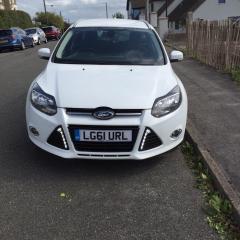
 

wiring DRLs

Featured Replies

Hi all, need some advice please. Have purchased DRLs for my MK111 focus titanium estate 2011. They replace the two front triangle grills. The wiring diagram on the harness shows that the Black wire to battery earth,the Red wire to battery live, Blue wire to ACC, White wire to dipped h/lights, Yellows wires to both sidelights. On testing operation the DRLs flash when sidelights on then remain static when Headlights on.They do not go off till i switch ignition off and there is a delay of approx 20 seconds. Have also got a Green wire in the loom but nothing on the diagram as to where this is to be connected. Would appreciate any help on this please.


I’m a sure @Phil21185 fitted the triangle type ones on his car

The triangle design DRL lights for the Focus MK3 are produced by several Chinese manufacturers. There are litterally dozens of these DRL kits that may look identical but are technically different and most important are different quality. I bought myself a high quality set of these triangle design DRL lights 4 Years ago and it worked without any problems ever since.

The cheaper triangle designs DRL lights are usually lower quality and have cheap generic Chinese DRL controllers. Some DRL controllers detect the voltage increase when the engine is running and switch the DRL ON/OFF based on the battery voltage. Most of these DRL controllers are not suitible for the Focus MK3 because of the relative high battery voltage an Battery Monitoring System..

I have installed several of these triangle design DRL kits and none of them did have the same DRL controller. 


If you can take detailed pictures of the DRL controller and the wiring schematic I can have a look at it if you want.

  • Author

To JW1982 

Hi Wilco, sorrty for delay getting back to you,purchsed my DRLs on Ebay. Have attached photos of lights and two wiring looms,the first wiring loom came with the lights and they told me Black to neg/battery and Red to pos/battery,which i did question but got same answer. The second loom i purchased online through Amazon which had all the wires detailed. Hope thats of help for you and thanks for your help.1355369234_focus017.thumb.JPG.a983395ee7c6e5abf9e7f936d077f0f3.JPG575845073_focus015.thumb.JPG.4714401a795901fb4bf99f068d29ccce.JPG459887608_focus014.thumb.JPG.7d28db1974f61731e405270da3ddb837.JPG1104954615_focus016.thumb.JPG.926b3867b1843739a773a3deea076e7e.JPGNot sure where the green wire comes in as not on diagram.

Ok I have an older version without the green drl controller the blue is to make indicator signals if you have sequential Drl's and the white is to dim when lights are on. As far as I can see the green is a new addition to flash so if you don't have indicator features and you don't want flashing then just use the white. Yes there is a delay until the power drops below 12v.

  • Author

Thanks Ian thats my problem i dont have the sequential DRL just the white light so i wont connect them. Pity its not made clear on wiring diagram. Thanks for your help,much appreciated.

No probs you also get sequential triangles also but think there is rules on how many indicators you can have. Think the site has had a dodgy upgrade or my browser has went mad everything is in text mode with massive images :(

15 hours ago, F0CUE said:

No probs you also get sequential triangles also but think there is rules on how many indicators you can have. Think the site has had a dodgy upgrade or my browser has went mad everything is in text mode with massive images :(

Don't worry mate, you weren't imagining it, the site definitely went mental last night!

  • 1 year later...

Hi all I have my focus mk3 on a 2012 plate and I wanted to fit these DRL'S what someone bought for me. They seem like a plug and play by having a red and black wire. I tested them direct on the battery on my car and both worked fine. I'm worried if I fit these to my car that they may not go off when the engine is not running. So how do I do this and to make them go off when the ignition is switched off and what is the blue wire for?

DRL'S.jpg

17 hours ago, Echo friend said:

Hi all I have my focus mk3 on a 2012 plate and I wanted to fit these DRL'S what someone bought for me. They seem like a plug and play by having a red and black wire. I tested them direct on the battery on my car and both worked fine. I'm worried if I fit these to my car that they may not go off when the engine is not running. So how do I do this and to make them go off when the ignition is switched off and what is the blue wire for?

DRL'S.jpg

As above you will need a Drl controller then you can follow my directions click Focue replied to topic to reach the correct post.. 


Aww that's well boss cheers for the info very helpful thanks.

Latest Deals

Ford UK Shop for genuine Ford parts & accessories

Disclaimer: As the club is an eBay Partner, The club may be compensated if you make a purchase via the club

Join the conversation

You can post now and register later. If you have an account, sign in now to post with your account.
Note: Your post will require moderator approval before it will be visible.

Guest
Reply to this topic...

The "Digestive"


Background Picker
Customize Layout

Account

Navigation

Search

Search

Configure browser push notifications

Chrome (Android)
  1. Tap the lock icon next to the address bar.
  2. Tap Permissions → Notifications.
  3. Adjust your preference.
Chrome (Desktop)
  1. Click the padlock icon in the address bar.
  2. Select Site settings.
  3. Find Notifications and adjust your preference.
