
Skip to content
View in the app

A better way to browse. Learn more.

Ford Owners Club - Ford Forums

A full-screen app on your home screen with push notifications, badges and more.

To install this app on iOS and iPadOS
  1. Tap the Share icon in Safari
  2. Scroll the menu and tap Add to Home Screen.
  3. Tap Add in the top-right corner.
To install this app on Android
  1. Tap the 3-dot menu (⋮) in the top-right corner of the browser.
  2. Tap Add to Home screen or Install app.
  3. Confirm by tapping Install.


Join the Independent Ford Owners' Club

Our community has been built by enthusiasts, for enthusiasts, and proudly run by Ford owners' for over 18 years. As an independent, non-official club, everything you’ll find here, advice, support, and opinions, comes directly from members with genuine Ford ownership experience.

Join our friendly community... it's Free!


Engine Management Light
Featured Replies

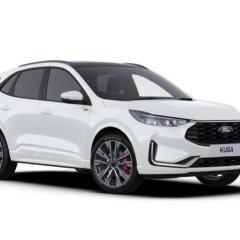
Whilst out today, I had a warning saying the battery in my key needed replaced.  On the return journey I noticed the engine management light on and assumed this was a generic warning lamp linked to the key fob battery. When I got home I replaced the key fob battery and the written warning has disappeared from the dash, but the engine management light is still on. How do you identify what the issue is that’s causing the engine management light to come on ?  My car is the current shape, 2021 MY Kuga ST Line X with 2 litre eco blue diesel. 


You need to use a Windows laptop with FORScan software. There are also versions of FORScan available for android and iphone.

FORScan: https://forscan.org/download.html

vLinker FS cable: https://www.amazon.co.uk/Vgate-vLinker-Adapter-FORScan-MS-CAN/dp/B0952P4MLP

You should still be under warranty contact dealer and let them sort it.

  • Author

Cheers for replies.  My laptop won’t operate unless plugged in the mains as it’s crap and old, so might not be an option. I thought there might be something in the dash menu that indicated what the error might be. 
 

As for my warranty. Unfortunately 23rd December was three years up and I didn’t renew it !!  Seemed like a good idea at the time.  

2 hours ago, Edge of Reason said:

My laptop won’t operate unless plugged in the mains as it’s crap and old, so might not be an option

Then I would say get the FORScan phone version. It does all the same reading as the Windows version, and even resets service indicators and clears DTC's. The only thing the phone version can't do is make programming changes.


  • Author

What a doughnut. I remembered today I had the Ford Pass App and having now checked for my error I got this…

I’m none the wiser but at least it doesn’t appear serious. I have now ordered an OBD connector from the previous link and I’ll download Forscan once the OBD thingy arrives. 

IMG_5864.png

  • 2 weeks later...
  • Author

Well I got my OBD thingy and Forscan and the fault code seems to be P24AE - Particulate Matter Sensor Circuit. 
 

Does this mean I need to buy a new sensor ?  If so where is it located and how do you swap it over ?  Any help would be greatly appreciated. 

That's not a very common DTC 🙁

I would have my doubts that you need a new sensor on a 2021 car.

Have you tried to clear all DTC's with FORScan ? If not I would do that now, this may just be a random code. Perhaps if @iantt sees this thread he might be able to offer some help.

  • Author

Yes I cleared all faults and ran the car. Two days later it came back on. This morning I again cleared the codes and two hours later it was back on. There is no loss of performance with the car. It runs perfectly normally. I’m just concerned that doing nothing might allow a minor issue to become a major one.  MOT not due til December but I think having the engine management light on might be a failure ??  

Yes management light on is an MOT failure these days 🙁

If the DTC keeps coming back then it does sound like there is a problem. If the issue becomes serious the car will go in to 'limp' mode to avoid causing damage.

Do you give your engine a good run out at least once a week ? The EcoBlue engine doesn't like lots of short runs without the chance of getting really hot now and then.

I suspect that this is just being caused by a build up of Soot.


  • Author

My car does do a fair amount of short journeys. After I cleared the codes this morning I took the car for a good run, in sport manual mode so I could keep the revs a bit higher, hoping the DPF would do a regen. Unfortunately during that journey the light came back on. 

From what I understand, the problem is that the level of soot being measured in the exhaust gas after the DPF is too high. To me this does not mean that the DPF is blocked, more that the level of soot inside is high probably due to the DPF needing to do a regen and burn the soot and convert it to ash.

You can with the laptop version of FORScan actually force a regen of the DPF. I don't know if you can do that with the mobile phone version.

OR......

If you get the engine nice and hot, then drive it at a constant 60mph for at least 30 miles then there is a very good chance that it will begin the regen process itself. Do not switch off the engine if the regen process starts as you must allow it to finish.

  • Author

That was my thought, to do a regen. I have the laptop version of Forscan but have only just got it and really have no idea what I’m doing. 
 

The attached is a photo of my laptop screen. Apologies for the glare. I thought there was a way of forcing a regen, but can’t see how and don’t want to bugger up my car by fiddling. I’ve heard horror stories about folk bricking their cars. 

IMG_5882.jpeg

  • Author

That’s why I tried today to drive in sport auto for a while to try and get the engine hot due to higher than normal revs, hoping it would do a regen. Is there something that actually tells you it’s doing it ?

When you have the app connected to the car, scroll down and select "Service" you should then be able to look for 'Regen'

Once started it takes about 45 to 50 minutes. It will use quite a lot of fuel (about 10 litres) and the exhaust will get crazy hot.

The option of going for a 30+ mile drive at a constant 60mph might be a better option for you.

  • Author

Yes that was my thought. I drove for over an hour. I don’t have a motorway near me so being able to travel at 60 constantly isn’t an option.  I have the Edinburgh Bypass but that’s only 15 miles long roughly and driven on by idiots who pull out in front of you or other stupid behaviour making a DPF burn unlikely. 

10 hours ago, unofix said:

That's not a very common DTC 🙁

I would have my doubts that you need a new sensor on a 2021 car.

Have you tried to clear all DTC's with FORScan ? If not I would do that now, this may just be a random code. Perhaps if @iantt sees this thread he might be able to offer some help.

The most  common sensor I replace is particulate matter sensor , but normally it relates to particulate matter temperature sensor circuit open. ( The same sensor) can't remember the DTC code. That failure can and does  occur at new.   So wouldn't be surprised at all if the sensor is faulty.  

  • Author

Good to know (kind of). Any idea where the sensor is located and how easy it is for a non-mechanic to swap ??

Looks like it could be a bit of a fiddle to loosen the sensor. It's removed from  underneath. There's only 4 wires on the connector. 12v , earth and canbus. . The sensor comes with a module assy . 

They are quite expensive so personally I would get a garage to confirm the sensor is at fault before getting it changed. 

Latest Deals

Ford UK Shop for genuine Ford parts & accessories

Disclaimer: As the club is an eBay Partner, The club may be compensated if you make a purchase via the club

Join the conversation

You can post now and register later. If you have an account, sign in now to post with your account.

Guest
Reply to this topic...

The "Digestive"


Background Picker
Customize Layout

Account

Navigation

Search

Search

Configure browser push notifications

Chrome (Android)
  1. Tap the lock icon next to the address bar.
  2. Tap Permissions → Notifications.
  3. Adjust your preference.
Chrome (Desktop)
  1. Click the padlock icon in the address bar.
  2. Select Site settings.
  3. Find Notifications and adjust your preference.
