
Skip to content
View in the app

A better way to browse. Learn more.

Ford Owners Club - Ford Forums

A full-screen app on your home screen with push notifications, badges and more.

To install this app on iOS and iPadOS
  1. Tap the Share icon in Safari
  2. Scroll the menu and tap Add to Home Screen.
  3. Tap Add in the top-right corner.
To install this app on Android
  1. Tap the 3-dot menu (⋮) in the top-right corner of the browser.
  2. Tap Add to Home screen or Install app.
  3. Confirm by tapping Install.


Join the Independent Ford Owners' Club

Our community has been built by enthusiasts, for enthusiasts, and proudly run by Ford owners' for over 18 years. As an independent, non-official club, everything you’ll find here, advice, support, and opinions, comes directly from members with genuine Ford ownership experience.

Join our friendly community... it's Free!


Thanks For The Welcome
Featured Replies

Hi"]Hi guy`s and thanks for the warm welcome. I think i`ve managed to sort the swimming pool in the boot problem with some windscreen/glass sealent so fingers crossed.

Now my attention is turned to a few other little niggles, firstly the dashboard cupholder is broken, i have a replacement but am unsure how to fit, do i dismantle the center console/remove radio for this?

And how do i find out the correct colour/code for tough up paint? I took a pic of the vin plate on drivers door if anyone can help with that.

Also, not sure if the engine should have a cover and/or bonnet insulation.

Many thanks in advance guy`s.

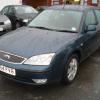
Ok, hopefully here come the pic`s, let me know what you think.....

KGrHqZHJCIE7yzN6m5BOuZciug60_12.jpg

KGrHqRHJBwE7y2kp7jBOu00TMg60_12.jpg

KGrHqFHJ0E7vS5lVBOuINi260_12.jpg

KGrHqNHJDEE7zHG5I-yBOuZyrGM60_12.jpg

KGrHqNHJBEE7HtcwUBOucMSLDw60_12.jpg

KGrHqZHJCYE7zE3g70VBOuZIMlQ60_12.jpg

vinplate002.jpg

vinplate001.jpg


remove gear stick gator and trim by pulling upwards,this will give you access to the trim surrounding the cup holder,remove the trim and you should see the screws that hold the cup holder in.

  • Author

Does the trim which surrounds the cupholder/boot release just pull off as i`ve tried this but the one piece trim which surrounds the gearstick/cupholder and boot release doesn`t seem to want to come off and i was a little worried about breaking something ....

Hi mate,

here is some information on your car:

Mondeo 2001-2007, 2.0L Duratec HE SEFI (145PS), Octane Blue VIN Number: WF05XXGBB54K17981

Registration Number: BG54FVB Registration Date: 15.12.2004 Registration Country: GB

Primary Features Build Date: 25.06.2004 Vehicle Line: Mondeo 2001-2007 Body Style: 5 Door Saloon Version: Series 40 Engine: 2.0L Duratec HE SEFI (145PS) Transmission: 4-Speed Automatic - CD4E Drive: RHD FWD Axle Ratio: 4.23 Emission: 2000 EEC (EEC 7) Air Conditioning: Automatic Air Conditioning Territory: (+)"GB" Paint: Octane Blue Interior Fabric: Tria

  • Author

Hi mate,

here is some information on your car:

Mondeo 2001-2007, 2.0L Duratec HE SEFI (145PS), Octane Blue VIN Number: WF05XXGBB54K17981

Registration Number: BG54FVB Registration Date: 15.12.2004 Registration Country: GB

Primary Features Build Date: 25.06.2004 Vehicle Line: Mondeo 2001-2007 Body Style: 5 Door Saloon Version: Series 40 Engine: 2.0L Duratec HE SEFI (145PS) Transmission: 4-Speed Automatic - CD4E Drive: RHD FWD Axle Ratio: 4.23 Emission: 2000 EEC (EEC 7) Air Conditioning: Automatic Air Conditioning Territory: (+)"GB" Paint: Octane Blue Interior Fabric: Tria

WOW...Thanks, don`t suppose you know the paint code?

WOW...Thanks, don`t suppose you know the paint code?

sorry mate i dont know the code but if you take the name of the paint to your local halfords they can give you the paint code based on the paint name, and if your wondering how i got your information on the car, i entered your Vin number in to ford Etis see the link:

http://www.etis.ford.com/vehicleRegSelector.do

a dealer or paint supplier will be able to match the colour of the car just by knowing "Octane Blue"

I know my local Paint guy just types Ford and Panther Black into his computer and it gives him the mixes

  • Author

sorry mate i dont know the code but if you take the name of the paint to your local halfords they can give you the paint code based on the paint name, and if your wondering how i got your information on the car, i entered your Vin number in to ford Etis see the link:

http://www.etis.ford...eRegSelector.do

Cheers, thanks
  • Author

sorry mate i dont know the code but if you take the name of the paint to your local halfords they can give you the paint code based on the paint name, and if your wondering how i got your information on the car, i entered your Vin number in to ford Etis see the link:

http://www.etis.ford...eRegSelector.do

Cheers, thanks

a dealer or paint supplier will be able to match the colour of the car just by knowing "Octane Blue"

I know my local Paint guy just types Ford and Panther Black into his computer and it gives him the mixes

Thanks for that dave

a dealer or paint supplier will be able to match the colour of the car just by knowing "Octane Blue"

I know my local Paint guy just types Ford and Panther Black into his computer and it gives him the mixes

That is very true Dave,

i got my boot handle resprayed a perfect match to the body, and i didnt even bring the car to the body shop just the panel and i told them it was moon dust silver, i didnt need to provide any codes.

  • Author

Just had a quick google on octane blue and came up with this

http://www.uniquecarsandparts.com.au/colour_codes_ford_europe_M-Z.htm

The last octane blue on this list has a code of 03 which tallies with the vin plate... Make any sense to anyone??

Latest Deals

Ford UK Shop for genuine Ford parts & accessories

Disclaimer: As the club is an eBay Partner, The club may be compensated if you make a purchase via the club

Join the conversation

You can post now and register later. If you have an account, sign in now to post with your account.

Guest
Reply to this topic...

The "Digestive"


Background Picker
Customize Layout

Account

Navigation

Search

Search

Configure browser push notifications

Chrome (Android)
  1. Tap the lock icon next to the address bar.
  2. Tap Permissions → Notifications.
  3. Adjust your preference.
Chrome (Desktop)
  1. Click the padlock icon in the address bar.
  2. Select Site settings.
  3. Find Notifications and adjust your preference.
