
Skip to content
View in the app

A better way to browse. Learn more.

Ford Owners Club - Ford Forums

A full-screen app on your home screen with push notifications, badges and more.

To install this app on iOS and iPadOS
  1. Tap the Share icon in Safari
  2. Scroll the menu and tap Add to Home Screen.
  3. Tap Add in the top-right corner.
To install this app on Android
  1. Tap the 3-dot menu (⋮) in the top-right corner of the browser.
  2. Tap Add to Home screen or Install app.
  3. Confirm by tapping Install.


Join the Independent Ford Owners' Club

Our community has been built by enthusiasts, for enthusiasts, and proudly run by Ford owners' for over 18 years. As an independent, non-official club, everything you’ll find here, advice, support, and opinions, comes directly from members with genuine Ford ownership experience.

Join our friendly community... it's Free!


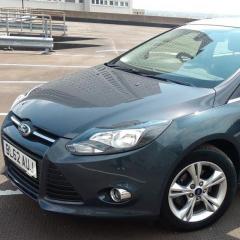
Ecoboost 1.0 125ps
Featured Replies

Hi there has anyone had a problem with there focus yet in terms of a metal clicking noise when the engine is under pressure i.e in gear 6 at 2000 revs


On 5/29/2016 at 10:39 PM, fureymister said:

Hi there has anyone had a problem with there focus yet in terms of a metal clicking noise when the engine is under pressure i.e in gear 6 at 2000 revs

Hey buddy,

I can say that I have not as of this morning when I parked up on 33,333 miles...

I can also safely say that I give the engine a lot of pressure haha I am quite often in 6th gear then go for the OT on the A1...

Does it only happen in 6th?

Cheers

  • 1 year later...
On 03/05/2016 at 10:45 AM, iantt said:


Easy to spot if you know what to look for, and a check with reg no on ford etis website will confirm if the recall is outstanding.


No issues with dual mass , but there were a few clutch problems apparently on early focuses, I never saw any. Alot prefer the 125 with the smooth 6 spd box, but I dont have any issues with my 100 5speed single mass (chipped to 140)

Hey Iantt - how do you check with a reg plate number (on Ford Etis) as I can only see it asking for a vin entry?

Also looking at getting a 125 or 100 not sure yet - will be driving on the motorway every now and then but more from town to town, thoughts would help..looking at the difference in power?

Thanks

https://www.etis.ford.com
i just checked and reg option is there, sometimes different browsers can affect the website . try a different browser.
as for 100 or 125, the 125 is a better option with the 6 speed box.
but ive had no issues with my 100 and 5 speed box. now 140hp but even when 100 it was fine for my local journeys.

11 hours ago, redjustin said:

Hey Iantt - how do you check with a reg plate number (on Ford Etis) as I can only see it asking for a vin entry?

Also looking at getting a 125 or 100 not sure yet - will be driving on the motorway every now and then but more from town to town, thoughts would help..looking at the difference in power?

Thanks

Although both versions will do the job, the 125BHP has a 6 speed box as well as more performance which should motorway 'cruising' a more pleasant experience.  (The longer 6th gear should mean you are revving lower at 70MPH so less fuel is used).

This is my Titanium X


The 1.0t ecoboost 125 is a fantastic engine.

IMG_4518.JPG

IMG_4536.JPG

IMG_4537.JPG

1 hour ago, Lee_Mc92 said:

This is my Titanium X


The 1.0t ecoboost 125 is a fantastic engine.

IMG_4518.JPG

IMG_4536.JPG

IMG_4537.JPG

My favourite colour! :biggrin: (apart from ASBO...sorry Electric Orange, lol)

On 27/08/2017 at 7:09 PM, 1979Damian said:

My favourite colour! :biggrin: (apart from ASBO...sorry Electric Orange, lol)

I like the ice blue, a real head turner but without the body kit, I can imagine it'll look simple


i love the 18" 8 spoke alloys 😍

Latest Deals

Ford UK Shop for genuine Ford parts & accessories

Disclaimer: As the club is an eBay Partner, The club may be compensated if you make a purchase via the club

Join the conversation

You can post now and register later. If you have an account, sign in now to post with your account.

Guest
Reply to this topic...

The "Digestive"


Background Picker
Customize Layout

Account

Navigation

Search

Search

Configure browser push notifications

Chrome (Android)
  1. Tap the lock icon next to the address bar.
  2. Tap Permissions → Notifications.
  3. Adjust your preference.
Chrome (Desktop)
  1. Click the padlock icon in the address bar.
  2. Select Site settings.
  3. Find Notifications and adjust your preference.
