
Skip to content
View in the app

A better way to browse. Learn more.

Ford Owners Club - Ford Forums

A full-screen app on your home screen with push notifications, badges and more.

To install this app on iOS and iPadOS
  1. Tap the Share icon in Safari
  2. Scroll the menu and tap Add to Home Screen.
  3. Tap Add in the top-right corner.
To install this app on Android
  1. Tap the 3-dot menu (⋮) in the top-right corner of the browser.
  2. Tap Add to Home screen or Install app.
  3. Confirm by tapping Install.


Join the Independent Ford Owners' Club

Our community has been built by enthusiasts, for enthusiasts, and proudly run by Ford owners' for over 18 years. As an independent, non-official club, everything you’ll find here, advice, support, and opinions, comes directly from members with genuine Ford ownership experience.

Join our friendly community... it's Free!


Triple r splitter installation
Featured Replies

Hi people, got my self a triple R splitter for my Fiesta ecoboost. At first I thought I had bought the wrong one, but now when I think of it I'm guessing the original little black splitter on the bottom of bumper may need removed before putting on the new splitter. If you look at the splitter, in the middle there is a little (mountain) type thing, an with the already splitter on, I don't think the new splitter will sit straight unless it is removed? Please take a look at the image and give me some info if you can! Would appreciate it! 

IMG_0580.JPG


The little splitter that it came out the factory with is called an aero splitter and I've seen people keep that and put the triple r splitter on as well. A lot of people with the black addition do it cause their areo splitter is red and they like the contrast of two splitters with different colours. 

I'm pretty sure it should fit ok with the small stock splitter on too, would also be much easier than removing the stock one... if you go onto the TRC website they have a fitting guide on there which may she some light upon the matter... Or ask a member who has the splitter on the zetec s ( there are plenty around )

Rob

  • Author

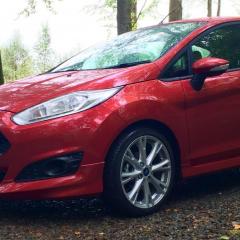
Managed to get it fitted fairly easy to do as well. When I first looked I didn't think it sat straight but when having a proper look it fits perfect. Looks the part to! 

9 hours ago, WillKinsella said:

Looks the part to! 

Photos or it didn't happen 😜

Got a fiesta zetec s and I removed the center air damp before fitting the triple r splitter . a bit of hard work if you have a big hands 😊😊

  • Author
13 hours ago, ThaiFiesta said:

Photos or it didn't happen 😜

Not the best pic, was just a quick one after a wash! Gonna start a build thread rather soon so will get some better pics up then of what I have done so far and what else is going to come!😅

IMG_0626.JPG

Looks good, what colour is your Fiesta? I had the Triple R fitted to mine for a day and ended up taking it off because I hated how it looked. It looks decent enough on yours though. 

Looking good man!

  • Author
On 03/11/2016 at 11:32 PM, opr said:

Looks good, what colour is your Fiesta? I had the Triple R fitted to mine for a day and ended up taking it off because I hated how it looked. It looks decent enough on yours though. 

I believe its called candy red, cheers man! Hoping to get the side ones soon so should look better with them fitted as well as being lowered😁

Latest Deals

Ford UK Shop for genuine Ford parts & accessories

Disclaimer: As the club is an eBay Partner, The club may be compensated if you make a purchase via the club

Join the conversation

You can post now and register later. If you have an account, sign in now to post with your account.
Note: Your post will require moderator approval before it will be visible.

Guest
Reply to this topic...

The "Digestive"


Background Picker
Customize Layout

Account

Navigation

Search

Search

Configure browser push notifications

Chrome (Android)
  1. Tap the lock icon next to the address bar.
  2. Tap Permissions → Notifications.
  3. Adjust your preference.
Chrome (Desktop)
  1. Click the padlock icon in the address bar.
  2. Select Site settings.
  3. Find Notifications and adjust your preference.
