
Skip to content
View in the app

A better way to browse. Learn more.

Ford Owners Club - Ford Forums

A full-screen app on your home screen with push notifications, badges and more.

To install this app on iOS and iPadOS
  1. Tap the Share icon in Safari
  2. Scroll the menu and tap Add to Home Screen.
  3. Tap Add in the top-right corner.
To install this app on Android
  1. Tap the 3-dot menu (⋮) in the top-right corner of the browser.
  2. Tap Add to Home screen or Install app.
  3. Confirm by tapping Install.


Join the Independent Ford Owners' Club

Our community has been built by enthusiasts, for enthusiasts, and proudly run by Ford owners' for over 18 years. As an independent, non-official club, everything you’ll find here, advice, support, and opinions, comes directly from members with genuine Ford ownership experience.

Join our friendly community... it's Free!


2010 Mk2.5 Focus TDCi Mods
Featured Replies

Hi Guys,

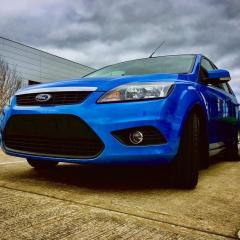
Bought myself a mk2 facelift a couple of weeks ago and am absolutely loving it!

Just wondered if anyone had any ideas where to start in terms of mods for a tdci as up to this point I've only ever have petrol focus' and fiestas.

Thanks! :smile:


What sort of mods do you want to do engine or body?

  • Author

@TangoDaz only light engine stuff for now, guessing standard things like air filters, cold air feeds?? Same with body, was thinking st splitter and diffuser??

I've got a petrol so can't help with engine lol  I fitted a splitter to my zetec s from triple r composites also fitted drl' sin fog covers, st smoked rear lights. Euro style clear rear fog (then smoked both reversing & fog lights) painted bonnet lip gloss black. Honey combe front grills, eonon head unit 

For more ideas take a look at Lenny's tutorial's and you won't go far wrong there's loads 


IMG_0499.JPG

Also painted mirror caps gloss black and smoked indicators 

posted a few photos 

IMG_0594.JPG

IMG_0597.JPG

Latest Deals

Ford UK Shop for genuine Ford parts & accessories

Disclaimer: As the club is an eBay Partner, The club may be compensated if you make a purchase via the club

Join the conversation

You can post now and register later. If you have an account, sign in now to post with your account.

Guest
Reply to this topic...

The "Digestive"


Background Picker
Customize Layout

Account

Navigation

Search

Search

Configure browser push notifications

Chrome (Android)
  1. Tap the lock icon next to the address bar.
  2. Tap Permissions → Notifications.
  3. Adjust your preference.
Chrome (Desktop)
  1. Click the padlock icon in the address bar.
  2. Select Site settings.
  3. Find Notifications and adjust your preference.
