
Skip to content
View in the app

A better way to browse. Learn more.

Ford Owners Club - Ford Forums

A full-screen app on your home screen with push notifications, badges and more.

To install this app on iOS and iPadOS
  1. Tap the Share icon in Safari
  2. Scroll the menu and tap Add to Home Screen.
  3. Tap Add in the top-right corner.
To install this app on Android
  1. Tap the 3-dot menu (⋮) in the top-right corner of the browser.
  2. Tap Add to Home screen or Install app.
  3. Confirm by tapping Install.


Join the Independent Ford Owners' Club

Our community has been built by enthusiasts, for enthusiasts, and proudly run by Ford owners' for over 18 years. As an independent, non-official club, everything you’ll find here, advice, support, and opinions, comes directly from members with genuine Ford ownership experience.

Join our friendly community... it's Free!


Ford Focus MK3.5 ST-1 Bulbs
Featured Replies

Hi all, 

is the bulb list for the MK3.5 ST-1 the same as a normal Focus MK3? And has any one got any recommendations for what bulbs people have used. 

Thanks 

Aaron


for sure same 🙂

  • Author
On 8/22/2018 at 12:20 PM, mastachaz said:

for sure same 🙂

Great I can swap the ones over from car to car then! 🙂

  • 2 weeks later...
  • Author

Has anyone changed there Indicators to LED I bought a set of osram bulbs but now the indicators flash faster than before. I think this would be a MOT failure (not that my mot is due till next year anyway)

if anyone has fitted any it would be great to know what ones. I want to upgrade all the bulbs to led in time. 

To stop the hyper flashing you need to fit resistors on at least one bulb per side.
Tbh you'd be better off keeping one pair as stsndard bulbs which will have the same effect (resistors can get pretty hot so having them in a plastic housing isn't recommended).
You can get chromed amber bulbs that will look fine.

Sent from my SM-G965F (S9+)

  • Author
26 minutes ago, Stoney871 said:

To stop the hyper flashing you need to fit resistors on at least one bulb per side.
Tbh you'd be better off keeping one pair as stsndard bulbs which will have the same effect (resistors can get pretty hot so having them in a plastic housing isn't recommended).
You can get chromed amber bulbs that will look fine.

Sent from my SM-G965F (S9+)
 

That’s what I had read online as well. Thanks for the reply 

  • Author

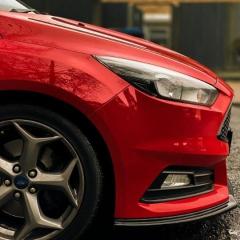
Front Bulbs upgraded 

H7-OSRAM Night Breaker Unlimited (dipped Beam

H1-OSRAM Night Breaker Unlimited (high beam)

H8-OSRAM Night Breaker Laser (fogs)

501-LED Side Light

IMG_6155 2.jpg

nice but looks not to white

  • Author
44 minutes ago, mastachaz said:

nice but looks not to white

If you got to white you loose the depth of the light. 

44 minutes ago, Aaron Harris said:

If you got to white you loose the depth of the light. 

so night breaker are not super white ?

  • Author
so night breaker are not super white ?


There whiter than your normal bulbs but not super white. I will see if I can get a photo from inside the car looking out when I next go out at night. The laser ones in the dogs are whiter again and have a wider beam there the newest range.


Sent from my iPhone using Tapatalk

Super white ones aren't legal in Europe, Phillips diamond vision are a lot whiter than Nightbreakers but not technically legal (though as an MOT tester can't remove the bulbs he wouldn't know...)

I used to swear by Nightbreakers but the quality and performance has really dropped in recent years so I stick with Phillips now.  Currently using Phillips White Vision which are as white as you can go while remaining legal.

Latest Deals

Ford UK Shop for genuine Ford parts & accessories

Disclaimer: As the club is an eBay Partner, The club may be compensated if you make a purchase via the club

Join the conversation

You can post now and register later. If you have an account, sign in now to post with your account.
Note: Your post will require moderator approval before it will be visible.

Guest
Reply to this topic...

The "Digestive"


Background Picker
Customize Layout

Account

Navigation

Search

Search

Configure browser push notifications

Chrome (Android)
  1. Tap the lock icon next to the address bar.
  2. Tap Permissions → Notifications.
  3. Adjust your preference.
Chrome (Desktop)
  1. Click the padlock icon in the address bar.
  2. Select Site settings.
  3. Find Notifications and adjust your preference.
