
Skip to content
View in the app

A better way to browse. Learn more.

Ford Owners Club - Ford Forums

A full-screen app on your home screen with push notifications, badges and more.

To install this app on iOS and iPadOS
  1. Tap the Share icon in Safari
  2. Scroll the menu and tap Add to Home Screen.
  3. Tap Add in the top-right corner.
To install this app on Android
  1. Tap the 3-dot menu (⋮) in the top-right corner of the browser.
  2. Tap Add to Home screen or Install app.
  3. Confirm by tapping Install.


Join the Independent Ford Owners' Club

Our community has been built by enthusiasts, for enthusiasts, and proudly run by Ford owners' for over 18 years. As an independent, non-official club, everything you’ll find here, advice, support, and opinions, comes directly from members with genuine Ford ownership experience.

Join our friendly community... it's Free!


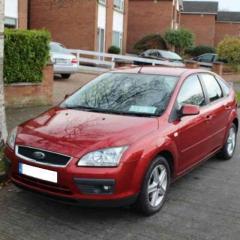
2007 Focus rear hatch release not working
Featured Replies

Hi all,

I have a remote fob keyless entry system on my Focus.

I bought it a few weeks ago (privately) but am now finding the niggles that I missed on the day of purchase.

The most annoying is that as I approach the car, the hatchback does not unlock and I need to press the boot release fob button twice to open it.

Would anyone know the part number for this, or is it repairable?


Also the square black button on the drivers door handle doesn't lock the car (passenger side is fine)

Again, is this an easy fix or a replacement part? It's actually a button and not just a sensor.

I'm guessing water ingress causing both issues.


Thanks for any advice.


  • Author

Anyone?? 🤔

Have you tried replacing the fob battery? Inpect the board inside too as the micro switches fall off the boot one might be on its way that's what my open button done before it fell off. Not sure what you mean with the black button on door though.

  • Author

Hi,

the fob seems to be fine as it opens the 4 doors as I approach the car, just doesn't unlock the boot.

The black square is on the door handle, pressing it is meant to lock and arm the car (so you never have to take your keys out of your pocket / bag)

Driver's side does nothing when I press it, but passenger side button locks and arms the car as it should.

I hope this makes sense 🙂


Don't have that button on mines and my boot is pretty much the same at opening takes a couple of clicks maybe it's meant to be that way but yes annoying.

11 minutes ago, F0CUE said:

Don't have that button on mines and my boot is pretty much the same at opening takes a couple of clicks maybe it's meant to be that way but yes annoying.

The OP has optional keyless entry which is why hers has buttons on the handles and yours doesn't.  Rare option on a Mk2!


I can't really understand why the boot won't unlock on the passive keyless but will on the fob button, that's very odd tbh.  The drivers door handle button is probably faulty as you suggest though, best thing to do there would be to test the button with a multimeter.  If the button works then it'll be the door latch at fault, if not it'll be the button at fault and you'll need to replace the whole handle.  Good used replacements from ebay or a breakers should be fine, but may be difficult to find due to their rarity.


  • Author

Certainly seems to be rare on a 2007 model. Every time I go to a supermarket car park I'm looking out for similar handles, but yet to see the lock button on another Focus.

Gadgets and gizmos are great, until they brake! 🙁

Latest Deals

Ford UK Shop for genuine Ford parts & accessories

Disclaimer: As the club is an eBay Partner, The club may be compensated if you make a purchase via the club

Join the conversation

You can post now and register later. If you have an account, sign in now to post with your account.
Note: Your post will require moderator approval before it will be visible.

Guest
Reply to this topic...

The "Digestive"


Background Picker
Customize Layout

Account

Navigation

Search

Search

Configure browser push notifications

Chrome (Android)
  1. Tap the lock icon next to the address bar.
  2. Tap Permissions → Notifications.
  3. Adjust your preference.
Chrome (Desktop)
  1. Click the padlock icon in the address bar.
  2. Select Site settings.
  3. Find Notifications and adjust your preference.
