
Skip to content
View in the app

A better way to browse. Learn more.

Ford Owners Club - Ford Forums

A full-screen app on your home screen with push notifications, badges and more.

To install this app on iOS and iPadOS
  1. Tap the Share icon in Safari
  2. Scroll the menu and tap Add to Home Screen.
  3. Tap Add in the top-right corner.
To install this app on Android
  1. Tap the 3-dot menu (⋮) in the top-right corner of the browser.
  2. Tap Add to Home screen or Install app.
  3. Confirm by tapping Install.


Join the Independent Ford Owners' Club

Our community has been built by enthusiasts, for enthusiasts, and proudly run by Ford owners' for over 18 years. As an independent, non-official club, everything you’ll find here, advice, support, and opinions, comes directly from members with genuine Ford ownership experience.

Join our friendly community... it's Free!


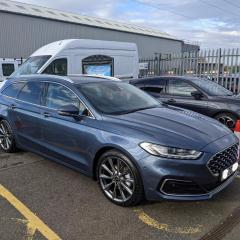
Remote Start-Mondeo Vignale Hybrid Estate
Featured Replies

I purchased my Mondeo in November last year and the remote start has never worked and after 2 months of emails back and forth with Ford they have admitted my car does have the functionality and there is an issue with ALL Ford Mondeos.

Does any one else have this issue or have you been able to resolve the issue?

I have attached to pictures I had to send to Ford to prove I had the functionality.


Many Thanks


ForrdPass.png

Car-settings.jpg


Hi

I don't believe that to be true. Is it a brand new mk5.5? I admin a Mondeo Facebook group and we haven't come across that issue at all. We have successfully added remote start to several members cars without any issues at all - something Ford said couldn't be done, so I'm sure we could sort your problem out. 

Mondeo group


https://www.facebook.com/groups/693277794183606/?ref=share


  • Author
25 minutes ago, Jonro2009 said:

Hi

I don't believe that to be true. Is it a brand new mk5.5? I admin a Mondeo Facebook group and we haven't come across that issue at all. We have successfully added remote start to several members cars without any issues at all - something Ford said couldn't be done, so I'm sure we could sort your problem out. 

Mondeo group


https://www.facebook.com/groups/693277794183606/?ref=share


Thanks Jonro2009,

I have sent a request to join the group on Facebook.

On 2/2/2021 at 12:14 PM, Jonro2009 said:

Hi

I don't believe that to be true. Is it a brand new mk5.5? I admin a Mondeo Facebook group and we haven't come across that issue at all. We have successfully added remote start to several members cars without any issues at all - something Ford said couldn't be done, so I'm sure we could sort your problem out. 

Mondeo group


https://www.facebook.com/groups/693277794183606/?ref=share


Is it only the 5.5's that can have remote start?

  • 1 month later...
On 2/2/2021 at 12:14 PM, Jonro2009 said:

Hi

I don't believe that to be true. Is it a brand new mk5.5?

Sorry to be a pest, but I see talk of Mondeo Mk4.5 and now 5.5 - what are the differences and when did they change, please? 

21 minutes ago, Amun said:

Sorry to be a pest, but I see talk of Mondeo Mk4.5 and now 5.5 - what are the differences and when did they change, please? 

The mk4.5 was the Mondeo pre 2014\14 and the Mk5 went on sale in 2015, the mk5.5 - which is a facelift of the Mk5, went on sale 2020.

On 2/3/2021 at 3:23 PM, The Latman said:

Is it only the 5.5's that can have remote start?

Yeah only the newer models that are fitted with a telematics control module that communicates to the Ford Pass app

4 hours ago, Jonro2009 said:

The mk4.5 was the Mondeo pre 2014\14 and the Mk5 went on sale in 2015, the mk5.5 - which is a facelift of the Mk5, went on sale 2020.

So... did it change to the Mk4.5 when they removed the front chrome strip on the bonnet? My 2010 Mk4 had it, but my 2012 Mk4 doesn't. 

The Mk4.5 was late 2010 to 2014

8 minutes ago, Jonro2009 said:

The Mk4.5 was late 2010 to 2014

Yes, that would match up - many thanks...

Latest Deals

Ford UK Shop for genuine Ford parts & accessories

Disclaimer: As the club is an eBay Partner, The club may be compensated if you make a purchase via the club

Join the conversation

You can post now and register later. If you have an account, sign in now to post with your account.

Guest
Reply to this topic...

The "Digestive"


Background Picker
Customize Layout

Account

Navigation

Search

Search

Configure browser push notifications

Chrome (Android)
  1. Tap the lock icon next to the address bar.
  2. Tap Permissions → Notifications.
  3. Adjust your preference.
Chrome (Desktop)
  1. Click the padlock icon in the address bar.
  2. Select Site settings.
  3. Find Notifications and adjust your preference.
