
Skip to content
View in the app

A better way to browse. Learn more.

Ford Owners Club - Ford Forums

A full-screen app on your home screen with push notifications, badges and more.

To install this app on iOS and iPadOS
  1. Tap the Share icon in Safari
  2. Scroll the menu and tap Add to Home Screen.
  3. Tap Add in the top-right corner.
To install this app on Android
  1. Tap the 3-dot menu (⋮) in the top-right corner of the browser.
  2. Tap Add to Home screen or Install app.
  3. Confirm by tapping Install.


Join the Independent Ford Owners' Club

Our community has been built by enthusiasts, for enthusiasts, and proudly run by Ford owners' for over 18 years. As an independent, non-official club, everything you’ll find here, advice, support, and opinions, comes directly from members with genuine Ford ownership experience.

Join our friendly community... it's Free!
 

Autolights

Featured Replies

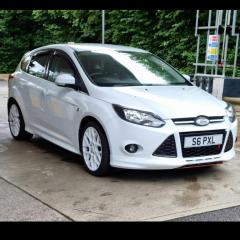
So I have just fitted autolights switch to my mk3 focus zetec s and they are a plug and play, no set up of any kind. Chuffed. Now i won't be driving around with no lights on. 🤣


I assume you have fitted more than just the auto light switch? 

  • Author
36 minutes ago, iantt said:

I assume you have fitted more than just the auto light switch? 

Nope, just the switch. Took out the old, out in the new. I'm incapable of anything more than that 🤣

Won't work correctly without a sensor to detect when it gets dark. Lights will be permanently on regardless day or night. 

1 hour ago, iantt said:

Won't work correctly without a sensor to detect when it gets dark. Lights will be permanently on regardless day or night. 

Some have been fortunate to have the sensor already there and changing the switch has done the job.

1 hour ago, F0CUE said:

Some have been fortunate to have the sensor already there and changing the switch has done the job.

I've never seen one with a sensor already fitted. Those vehicles must have been missbuilds with auto wipers only. 

9 minutes ago, iantt said:

I've never seen one with a sensor already fitted. Those vehicles must have been missbuilds with auto wipers only. 

Seen a few posts in other forums for specifically the s version having it already but who knows 🤣 on my MK2 style that had foot well lights and wasn't supposed to so ford do make these weird errors.

Yeah, I've seen a few missbuilds and random specs not on any ford brochures. There's a few nearly new ones circulating dealerships at the moment. 

  • Author
17 hours ago, iantt said:


No, I don't have the sensor on my car, the lights will be on all the time. Which is fine with me, my old v50 did that. I'd rather they were on all the time, than off all the time 🤣. Sorry, I wasn't clear on that. I was just chuffed that I won't forget to put my lights on anymore.

20 hours ago, Boulton said:

... Now i won't be driving around with no lights on. 🤣

In over 40 years of driving, I've never forgotten to turn the lights on when needed LOL Now, a feature I would love to see on all cars is an auto switch off of rear fog lights when visibility is fine! 🤣

  • Author
29 minutes ago, StephenFord said:

In over 40 years of driving, I've never forgotten to turn the lights on when needed LOL Now, a feature I would love to see on all cars is an auto switch off of rear fog lights when visibility is fine! 🤣

I never used to have a problem with turning lights on. But my previous car had autolights and in the Focus, you get in and the dash all lights up as if I've turned the lights on. I just can't get used to it.

33 minutes ago, StephenFord said:

In over 40 years of driving, I've never forgotten to turn the lights on when needed LOL Now, a feature I would love to see on all cars is an auto switch off of rear fog lights when visibility is fine! 🤣

I seem to commonly see more people driving with no lights in fog since autolights became a thing.

1 hour ago, Boulton said:

No, I don't have the sensor on my car, the lights will be on all the time. Which is fine with me, my old v50 did that. I'd rather they were on all the time, than off all the time 🤣. Sorry, I wasn't clear on that. I was just chuffed that I won't forget to put my lights on anymore.

Don't the lights go off with ignition on the Mk3 Focus if you just leave them switched on?

I've had auto lights on pretty much every car in the last decade so never think about turning them off.  In my current Golf, the MOT garage always turn them to 'on' for the test but then leave them on...and I end up driving around for a week or two with the lights on during the day as they switch off with ignition so I don't realise they're on for several days! :laugh:  The Golf also doesn't come with a 'lights on' tell-tale on the dash, the only tell tale is on the light switch itself, which can't really be seen from the drivers seat. :rolleyes: 

6 hours ago, TomsFocus said:

Don't the lights go off with ignition on the Mk3 Focus if you just leave them switched on?

Yep. 

I'm not sure all MK3s do as I found out unfortunately. I had knocked the light switch with my knee getting out of mine one evening, didn't even notice the car beeping at me then the next day, completely dead. Realised what I'd done with the switch. 

Charged it up and tested it, lights stayed on after switching ignition off! I updated the bcm and after that, they did go off with the ignition

  • Author
1 hour ago, iantt said:

Yep. 

Unfortunately not mine. 

Mines goes off when the ignition is turned off but if only side lights are on then you get the beep.

Latest Deals

Ford UK Shop for genuine Ford parts & accessories

Disclaimer: As the club is an eBay Partner, The club may be compensated if you make a purchase via the club

Join the conversation

You can post now and register later. If you have an account, sign in now to post with your account.

Guest
Reply to this topic...

The "Digestive"


Background Picker
Customize Layout

Account

Navigation

Search

Search

Configure browser push notifications

Chrome (Android)
  1. Tap the lock icon next to the address bar.
  2. Tap Permissions → Notifications.
  3. Adjust your preference.
Chrome (Desktop)
  1. Click the padlock icon in the address bar.
  2. Select Site settings.
  3. Find Notifications and adjust your preference.
