
Skip to content
View in the app

A better way to browse. Learn more.

Ford Owners Club - Ford Forums

A full-screen app on your home screen with push notifications, badges and more.

To install this app on iOS and iPadOS
  1. Tap the Share icon in Safari
  2. Scroll the menu and tap Add to Home Screen.
  3. Tap Add in the top-right corner.
To install this app on Android
  1. Tap the 3-dot menu (⋮) in the top-right corner of the browser.
  2. Tap Add to Home screen or Install app.
  3. Confirm by tapping Install.


Join the Independent Ford Owners' Club

Our community has been built by enthusiasts, for enthusiasts, and proudly run by Ford owners' for over 18 years. As an independent, non-official club, everything you’ll find here, advice, support, and opinions, comes directly from members with genuine Ford ownership experience.

Join our friendly community... it's Free!
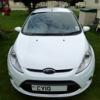
 

It's Arrived!

Featured Replies

Well, a phone call from my dealers on Monday saw me driving up the next day to pick up my new 1.4 Fiesta Zetec :)

I'd ordered it on June 3rd and picked it up on August 3rd.

First impressions are:

1. It's beautiful :P

2. It handles very well. Very little body roll on the tighter curves of North Wales roads and allows precise positioning. Compared to my 1.3 Toyota Yaris, it's a lot less work and although the specs are similar on paper, it's a totally different animal to drive with far less understeer.

3. The 16" seven spoke alloys, with their 6.5" wide tyres, make cornering very positive and I'm pleased with the look they give the car.

4. The gadgets are great fun, although I may have to read the manual for once! Love the voice activation. My BlackBerry Storm paired effortlessly via Bluetooth and the car's microphone/speakers make calls very easy.

5. Playing music off my phone via Bluetooth is also a breeze. I've yet to tackle playing music from my iPod or USB memory stick.

6. Petrol consumption was a little worrying to begin with but is currently at a healthy 46mpg.

7. The parking sensors work fine and can make some interesting tunes when parking in a confined space :D

8. It's going to take quite a while before I get my head around all the features and controls. I'm still washing the rear window more than operating the windscreen wipers when it rains! :lol:

fez1.jpg

fez2.jpg

fez3.jpg

fez4.jpg

fez5.jpg

fez7.jpg


Very nice, dont think i could wait that long though :( :lol:

Nice car i would have to take the dealers name of the boot lid tho why they put it there i don't know.

Nice looking Fiesta.

Nice Fiesta Al J!

I know what you mean about all the controls / gadgets.... I went from a 1998 Fiesta Zetec to a 2010 model & it was like sitting in a space ship in the new one & I still can't get the hang of having electric windows!

Enjoy your new wheels...

  • Author

Thanks for the replies everyone :)

Nice car i would have to take the dealers name of the boot lid tho why they put it there i don't know.

Normally, I'd agree and always remove dealer stickers shortly after getting a new car. In this case, it's a little different though. Gwyndaf Evans is a rally driver with an impressive past and was something of a hero of mine, so it's staying :D

He's a top bloke too and we spent some time discussing the way the car drives. I imagine he could get a lot more out of the car than I ever will! The family is still involved in rallying and while I was there, I was shown a Fiesta being prepared to rally spec.

Gwyndaf Evans

Latest Deals

Ford UK Shop for genuine Ford parts & accessories

Disclaimer: As the club is an eBay Partner, The club may be compensated if you make a purchase via the club

Join the conversation

You can post now and register later. If you have an account, sign in now to post with your account.

Guest
Reply to this topic...

The "Digestive"


Background Picker
Customize Layout

Account

Navigation

Search

Search

Configure browser push notifications

Chrome (Android)
  1. Tap the lock icon next to the address bar.
  2. Tap Permissions → Notifications.
  3. Adjust your preference.
Chrome (Desktop)
  1. Click the padlock icon in the address bar.
  2. Select Site settings.
  3. Find Notifications and adjust your preference.
