
Skip to content
View in the app

A better way to browse. Learn more.

Ford Owners Club - Ford Forums

A full-screen app on your home screen with push notifications, badges and more.

To install this app on iOS and iPadOS
  1. Tap the Share icon in Safari
  2. Scroll the menu and tap Add to Home Screen.
  3. Tap Add in the top-right corner.
To install this app on Android
  1. Tap the 3-dot menu (⋮) in the top-right corner of the browser.
  2. Tap Add to Home screen or Install app.
  3. Confirm by tapping Install.


Join the Independent Ford Owners' Club

Our community has been built by enthusiasts, for enthusiasts, and proudly run by Ford owners' for over 18 years. As an independent, non-official club, everything you’ll find here, advice, support, and opinions, comes directly from members with genuine Ford ownership experience.

Join our friendly community... it's Free!


Sat Nav for red edition?
Featured Replies

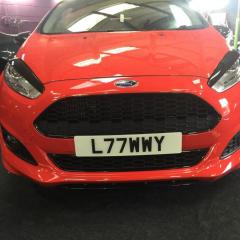
I have a red edition fiesta, it's got the new screen in it which you can get sat nav on it, can I put sat nav on myself? Like upload it onto it? If so, how do I do it?


You get 2 different models, to get the Sat nav you have to order from the factory & I think it has a different screen (larger)

I don't think you will be able to upload to the one without it already installed

1.0 EcoBoost 140 Navigation £16,745

1.0 EcoBoost 140 £16,345

I wouldn't bother even if you could. Factory sat nav is rubbish, especially when compared to a decent 'Tom Tom'. 

They are offering it for £99 extra at the moment when you buy a new Fiesta 

I've understood that the new Red Editions (and possibly all the other cars in the range) now come with the same coloured screen that comes with the sat nav as standard - but as others have said, I believe you need to have the Sat Nav installed at the factory (though someone may prove me wrong).

Unsure about this, I know the VW's/Audis come with it pre-built in which you have to pay another £399 to unlock the feature. However I think if its not installed on the car, then the effort to go about installing it (if it was possible) would outweigh the positives. I have Waze on my phone (FREE) and even though it won't look as good as a factory fitted system, the traffic updates, routes, and features on it outweigh most system fitted sat navs.


Just looks a bit ugly but if you can get one of the magnet fitted dash mounts for your phone they can actually look quite good! 

There is no way you can just 'upload' the navigation on a non-navi radio.
You need a different screen (one with a sd-card holder), different facia (with navi buttons), different dashboard trim on top of the screen, a GPS antenna (behind your rear view mirror) and additional cables.
When all that is in place, you need to activate it with an IDS computer.

Total cost, a lot...

Is it not only available on the Sony unit?

Just checked, the standard screen is 4.2" while the one for the Nav system is 5"

1 hour ago, ayrshiredude said:

Just checked, the standard screen is 4.2" while the one for the Nav system is 5"

I thought the sat nav screen was bigger, now confirmed.

when I ordered my 140 last October the only sat nav option was the Ford head unit as I asked for the Sony sat nav system but they said that it was not an option on the Red edition.

So I told them you have lost out as I would buy a tomtom now as the upgrade price for the Sat nav was silly money unless it was for the Sony unit

Latest Deals

Ford UK Shop for genuine Ford parts & accessories

Disclaimer: As the club is an eBay Partner, The club may be compensated if you make a purchase via the club

Join the conversation

You can post now and register later. If you have an account, sign in now to post with your account.
Note: Your post will require moderator approval before it will be visible.

Guest
Reply to this topic...

The "Digestive"


Background Picker
Customize Layout

Account

Navigation

Search

Search

Configure browser push notifications

Chrome (Android)
  1. Tap the lock icon next to the address bar.
  2. Tap Permissions → Notifications.
  3. Adjust your preference.
Chrome (Desktop)
  1. Click the padlock icon in the address bar.
  2. Select Site settings.
  3. Find Notifications and adjust your preference.
