
Skip to content
View in the app

A better way to browse. Learn more.

Ford Owners Club - Ford Forums

A full-screen app on your home screen with push notifications, badges and more.

To install this app on iOS and iPadOS
  1. Tap the Share icon in Safari
  2. Scroll the menu and tap Add to Home Screen.
  3. Tap Add in the top-right corner.
To install this app on Android
  1. Tap the 3-dot menu (⋮) in the top-right corner of the browser.
  2. Tap Add to Home screen or Install app.
  3. Confirm by tapping Install.


Join the Independent Ford Owners' Club

Our community has been built by enthusiasts, for enthusiasts, and proudly run by Ford owners' for over 18 years. As an independent, non-official club, everything you’ll find here, advice, support, and opinions, comes directly from members with genuine Ford ownership experience.

Join our friendly community... it's Free!


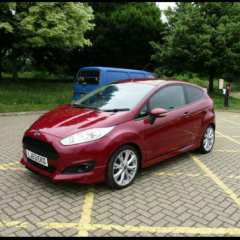
Fiesta 2013 Zetec S falling apart?
Featured Replies

Hi Guys,


Thought I would post here before going to a mechanic (Christmas funds are tight).

Pulled up to my driveway tonight and as I got out of the car (with it still on) to press in the key code for our block carpark there was a sound emitted from the underside of the car that can be described as pant wettingly scary.

It sounded like a load of tin cans being dragged behind a wedding car, REALLY loud. Everyone in the street looked round and it lasted about 10 seconds. It hasn't done it again (I popped out again). Any one else had this?! Worried that the bottom of my car is going to fall apart! 


Jack it up and have a look underneath. To sound like that it could be a loose heat shield vibrating, give the exhaust silencers and cat a bang too to see if they are breaking up inside. It could also be other things but check the basics first. Are you sure it was not in the engine bay? Have a look at the fan, leave the car running until its upto temperature so it kicks in to rule it out if its just the usual fan sound. Hopefully its nothing in the engine itself. Did it drive ok after the noise stopped, no loss of power or other unusual sounds?

If you dont want to jack it up then just nip to a local garage or fast fit centre and let them get it up on the ramps. They can show you whats wrong if they find anything and then its upto you if they fix it or you do it yourself depending what the findings are.

  • Author
2 hours ago, WES180 said:

Jack it up and have a look underneath. To sound like that it could be a loose heat shield vibrating, give the exhaust silencers and cat a bang too to see if they are breaking up inside. It could also be other things but check the basics first. Are you sure it was not in the engine bay? Have a look at the fan, leave the car running until its upto temperature so it kicks in to rule it out if its just the usual fan sound. Hopefully its nothing in the engine itself. Did it drive ok after the noise stopped, no loss of power or other unusual sounds?

If you dont want to jack it up then just nip to a local garage or fast fit centre and let them get it up on the ramps. They can show you whats wrong if they find anything and then its upto you if they fix it or you do it yourself depending what the findings are.

Thank you for your reply!

I'm about as much of a mechanic as the Queen is Spanish!

It was a horrific noise, like someone shaking pebbles in a tin can.

Its had no loss of power since, I might take it to the garage then. they won't charge for taking a look?

They have never charged me. They need to look to be able to quote for the repair. Obviously if they suspect internal engine damage then they are not going to strip it down to find the problem for free and then put it back together and pass you a quote. If its something like the exhaust shields or silencers then a fastfit centre should check for free. Have a look in the fan area incase something got caught up in it.

Latest Deals

Ford UK Shop for genuine Ford parts & accessories

Disclaimer: As the club is an eBay Partner, The club may be compensated if you make a purchase via the club

Join the conversation

You can post now and register later. If you have an account, sign in now to post with your account.
Note: Your post will require moderator approval before it will be visible.

Guest
Reply to this topic...

The "Digestive"


Background Picker
Customize Layout

Account

Navigation

Search

Search

Configure browser push notifications

Chrome (Android)
  1. Tap the lock icon next to the address bar.
  2. Tap Permissions → Notifications.
  3. Adjust your preference.
Chrome (Desktop)
  1. Click the padlock icon in the address bar.
  2. Select Site settings.
  3. Find Notifications and adjust your preference.
