
Skip to content
View in the app

A better way to browse. Learn more.

Ford Owners Club - Ford Forums

A full-screen app on your home screen with push notifications, badges and more.

To install this app on iOS and iPadOS
  1. Tap the Share icon in Safari
  2. Scroll the menu and tap Add to Home Screen.
  3. Tap Add in the top-right corner.
To install this app on Android
  1. Tap the 3-dot menu (⋮) in the top-right corner of the browser.
  2. Tap Add to Home screen or Install app.
  3. Confirm by tapping Install.


Join the Independent Ford Owners' Club

Our community has been built by enthusiasts, for enthusiasts, and proudly run by Ford owners' for over 18 years. As an independent, non-official club, everything you’ll find here, advice, support, and opinions, comes directly from members with genuine Ford ownership experience.

Join our friendly community... it's Free!


Front & Rear Heated Windscreens Not Working
Featured Replies

Hey all!

Got a bit of an annoying issue (or soon to be anyway!) where both my front and rear heated windscreens don't work. Upon pressing the buttons in the cabin. neither light up.

I've only had the car about 2 months, and only last week needed to use the feature, just to find out it wasn't working!

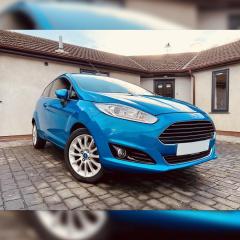
The car is a 2013 Titanium X Fiesta - 1.6 Diesel

I've been reading up and heard it could be a battery issue since the heated screens draw a lot of power and perhaps the car has a failsafe to not allow them to turn on in case the battery is running low. Due to current circumstances, the car only gets a decent run about once or twice a week, so I'm not sure if that'll be hindering this issue at all.

Any help would be greatly appreciated, thanks!


Might sound basic but if you haven't already done so, find the correct fuses and relays involved in the window circuits and check them first. Each switch should make something go click. Where you can, get onto the power feed to each with a meter  and see what you get. If the elements are stuffed, it won't clear of course so you need to know if the power is getting there in the first place. 

38 minutes ago, HousePlantParty said:

I've been reading up and heard it could be a battery issue since the heated screens draw a lot of power and perhaps the car has a failsafe to not allow them to turn on in case the battery is running low. Due to current circumstances, the car only gets a decent run about once or twice a week, so I'm not sure if that'll be hindering this issue at all.

You are probably on the right track with this. Give the battery a full charge and see if that fixes it. 

1 hour ago, HousePlantParty said:

the car only gets a decent run about once or twice a week, so I'm not sure if that'll be hindering this issue at all.

I'd place my bets on this. You'll also have no end of trouble with the DPF if you can't even keep the heated windscreen working due to short journeys.

It's very unlikely that both screens have developed issues at the same time.

  • 4 months later...
  • Author

Just thought I'd update for anyone having similar issues who might find this thread.


Took the car to my local garage and they tested the battery and found it to only have 58% charge (no idea how old the battery was as I'd only had the car a couple of months) so I got that replaced and both front and rear heated windscreens started working thankfully!

Must be the cars way of protecting the battery by limiting those functions as they suck a lot of power from the system. Worth pointing out that the heated seats still worked however which I found to be a bit odd, but we move!

So for anyone with this issue I'd definitely recommend testing your battery!

That failing, the mechanic also mentioned it can sometimes be an issue with the master key, but since we never explored that option, I wouldn't know much about that fix!

Latest Deals

Ford UK Shop for genuine Ford parts & accessories

Disclaimer: As the club is an eBay Partner, The club may be compensated if you make a purchase via the club

Join the conversation

You can post now and register later. If you have an account, sign in now to post with your account.

Guest
Reply to this topic...

The "Digestive"


Background Picker
Customize Layout

Account

Navigation

Search

Search

Configure browser push notifications

Chrome (Android)
  1. Tap the lock icon next to the address bar.
  2. Tap Permissions → Notifications.
  3. Adjust your preference.
Chrome (Desktop)
  1. Click the padlock icon in the address bar.
  2. Select Site settings.
  3. Find Notifications and adjust your preference.
