
Skip to content
View in the app

A better way to browse. Learn more.

Ford Owners Club - Ford Forums

A full-screen app on your home screen with push notifications, badges and more.

To install this app on iOS and iPadOS
  1. Tap the Share icon in Safari
  2. Scroll the menu and tap Add to Home Screen.
  3. Tap Add in the top-right corner.
To install this app on Android
  1. Tap the 3-dot menu (⋮) in the top-right corner of the browser.
  2. Tap Add to Home screen or Install app.
  3. Confirm by tapping Install.


Join the Independent Ford Owners' Club

Our community has been built by enthusiasts, for enthusiasts, and proudly run by Ford owners' for over 18 years. As an independent, non-official club, everything you’ll find here, advice, support, and opinions, comes directly from members with genuine Ford ownership experience.

Join our friendly community... it's Free!


2007 Focus Wing Mirror
Featured Replies

dose anyone know a good/cheap place for a passenger side wing mirror (electric) it being silver would be handy

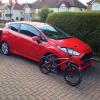
picture to makes things clearer

IMAG1014_zps06b77467.jpg

thanks again


Is it the whole mirror you're after or just the cover? At the risk of stating the obvious, ebay's probably your best bet mate.

You thought about trying to source the parts to do the wing mirror indicator mod?

  • Author

Is it the whole mirror you're after or just the cover? At the risk of stating the obvious, ebay's probably your best bet mate.

You thought about trying to source the parts to do the wing mirror indicator mod?

looking for the whole thing mate, haven't really thought about the mod tbh

thanks ebay seems to solve all my problems, also emailed a beaker on ebay, they want £35 all in. question is new or second hand?

are there any guides for fitting? seems easy but we ill see :)

It's dead easy mate, couple of screws. Here's a link for a guide on the indicator mod, it has all the instruction and pics you need for removing them anyway.

Another option if you can get a different colour for cheaper, you could get a bit of carbon or gloss black vinyl wrap and cover them yourself, just in case that broadens your search options.

I gathered up the parts for the indicator mod on the cheap, ended up with a black cover for one side and performance blue for the other, so I spent about £3 on ebay for a roll of carbon wrap and covered them myself.

  • Author

It's dead easy mate, couple of screws. Here's a link for a guide on the indicator mod, it has all the instruction and pics you need for removing them anyway.

Another option if you can get a different colour for cheaper, you could get a bit of carbon or gloss black vinyl wrap and cover them yourself, just in case that broadens your search options.

I gathered up the parts for the indicator mod on the cheap, ended up with a black cover for one side and performance blue for the other, so I spent about £3 on ebay for a roll of carbon wrap and covered them myself.

sorry but wheres the link?

thanks

Oops! Forgot to add the link! I was actually referring to the one from focusowners that I used to do the mod, I'd forgot you had since made a guide yourself on this forum!

lol thought you was referring to the focusowners one but thought i'd link mine instead as i took a few better pictures of some of the steps

i still need to take a few more photos though as i'm gonna show the actual threading of the wire through the mirror to make it clearer etc but its just getting round to it

Latest Deals

Ford UK Shop for genuine Ford parts & accessories

Disclaimer: As the club is an eBay Partner, The club may be compensated if you make a purchase via the club

Join the conversation

You can post now and register later. If you have an account, sign in now to post with your account.

Guest
Reply to this topic...

The "Digestive"


Background Picker
Customize Layout

Account

Navigation

Search

Search

Configure browser push notifications

Chrome (Android)
  1. Tap the lock icon next to the address bar.
  2. Tap Permissions → Notifications.
  3. Adjust your preference.
Chrome (Desktop)
  1. Click the padlock icon in the address bar.
  2. Select Site settings.
  3. Find Notifications and adjust your preference.
