
Skip to content
View in the app

A better way to browse. Learn more.

Ford Owners Club - Ford Forums

A full-screen app on your home screen with push notifications, badges and more.

To install this app on iOS and iPadOS
  1. Tap the Share icon in Safari
  2. Scroll the menu and tap Add to Home Screen.
  3. Tap Add in the top-right corner.
To install this app on Android
  1. Tap the 3-dot menu (⋮) in the top-right corner of the browser.
  2. Tap Add to Home screen or Install app.
  3. Confirm by tapping Install.


Join the Independent Ford Owners' Club

Our community has been built by enthusiasts, for enthusiasts, and proudly run by Ford owners' for over 18 years. As an independent, non-official club, everything you’ll find here, advice, support, and opinions, comes directly from members with genuine Ford ownership experience.

Join our friendly community... it's Free!


'ghosting' After Debadging
Featured Replies

Hi,

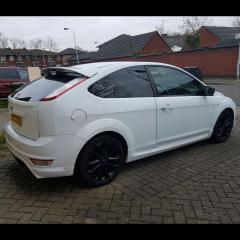
I recently removed the Zetec badge off my car and I think i've taken off pretty much everything that can come off i.e. the adhesive. I used Sticky Stuff Remover as i had it lying around the house and it did the job great. The only thing is i'm left with this outline that that can be seen if you're up close at certain angles.

IMG_20130623_124002_zps2ea9aba9.jpg

Do you think this is more adhesive...it doesn't come off...or does it look like that actual paint is marked/damaged? That's what it feels like anyway. Any tips on how to go about fixing it?

Thanks!


If you run your fingers over it - does it stick out/ stand proud of the surface, or does it "furrow" under the surface of the paint/ can you dig your nail into it? (can't tell from the picture)

Tar & glue remover will take off any sticky glue residue (don't let it get on any plastic trim- it can discolor it)

if the T&G does not work, try t-cut or

cutting compound/ buff should bring the rest of the paint on that panel up to a similar shade to the paintwork that was under the badge

The (rest of the) paint (on the car) can fade in the sun etc, the bits under the badge are protected from that (so are often closer to the original paint color)

If this does not work its possible the paint is damaged and options then are to respray it or live with it, IOM

  • Author

It feels like it's sticking out when I run my fingernail over it...like it could just be some really really stubborn residue...definitely cant dig my nail into it...it feels solid and on the surface whatever it is. Will give the Tar and Glue remover a shot first and see what happens.

Thanks!

Get a clay bar and some quick detailer to keep the surface wet or next time ur washing the car water works just as well as the detailer

Agree with the above, I would recommend giving it a T-CUT as well. just to blend the paintwork and remove all other traces of it.

I have this as well after debadging mine...haven't tried a cutting compound on it yet, but there's a local guy with a good rep for doing a '4 stage buff', so will get a chat to him soon and ask if that will take care of it and get it booked in then. Will be keeping an eye on your progress in the mean time!

  • Author

Thanks guys...just need to get the stuff and I'll report back.

I actually took the Focus off too and there's nothing like this on that side so that's odd.

all i use is t cut metallic on a slightly damp cloth spend 5 minutes rubbing the boot then i use a good quality polish and voila its gone

Latest Deals

Ford UK Shop for genuine Ford parts & accessories

Disclaimer: As the club is an eBay Partner, The club may be compensated if you make a purchase via the club

Join the conversation

You can post now and register later. If you have an account, sign in now to post with your account.

Guest
Reply to this topic...

The "Digestive"


Background Picker
Customize Layout

Account

Navigation

Search

Search

Configure browser push notifications

Chrome (Android)
  1. Tap the lock icon next to the address bar.
  2. Tap Permissions → Notifications.
  3. Adjust your preference.
Chrome (Desktop)
  1. Click the padlock icon in the address bar.
  2. Select Site settings.
  3. Find Notifications and adjust your preference.
