
Skip to content
View in the app

A better way to browse. Learn more.

Ford Owners Club - Ford Forums

A full-screen app on your home screen with push notifications, badges and more.

To install this app on iOS and iPadOS
  1. Tap the Share icon in Safari
  2. Scroll the menu and tap Add to Home Screen.
  3. Tap Add in the top-right corner.
To install this app on Android
  1. Tap the 3-dot menu (⋮) in the top-right corner of the browser.
  2. Tap Add to Home screen or Install app.
  3. Confirm by tapping Install.


Join the Independent Ford Owners' Club

Our community has been built by enthusiasts, for enthusiasts, and proudly run by Ford owners' for over 18 years. As an independent, non-official club, everything you’ll find here, advice, support, and opinions, comes directly from members with genuine Ford ownership experience.

Join our friendly community... it's Free!


When In Chrome..!
Featured Replies

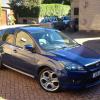
Bought myself some halfrauds chrome detailing strip and here are the results. Hope u like how it looks. I sure do. The other half doesn't see the difference but hopefully you guys will

Before

post-47700-138843677155_thumb.jpg

After

post-47700-138843681322_thumb.jpg

Lee


I like it - seems to finish it off.

(Although as you can see from the front of mine I like a little extra chrome lol).

hi what size did you use

  • Author

hi what size did you use

Hi. I used 8mm with the 3m sticky tape included. Just made sure I cleaned all surfaces properly and heated with a hairdryer to make sure it sticks properly.

Lee

cool iam going to do this looks good :) :) :) :)

Subtle and not too in your face, just the way it should be.

There's a plonker living near me with a Chrysler PT that has chrome trimming on all panel joints, bumpers, doors, around lights/mirrors and door edges.

He's even fitted big chrome badges on the boot and it all looks hideously overdone.

The fact that half of it is also peeling off really brings bile to my throat.

post-35185-0-80479400-1388438406_thumb.j

don't go overboard fella's spotted this one a couple of years back lol

ha ha I remember that post got a lot of views

attachicon.gifphoto (1).JPG

don't go overboard fella's spotted this one a couple of years back lol

Its just peoples way of making their car unique in their own minds,Thats half of what modding cars is about.

There's tasteful and then there's 'Oh sweet Jesus what the hell were you thinking???'

I know which category that falls into.

Halfords must have sold out that day. ;)

Sent using Ford OC mobile app

i wish i jumped out the car and took a pic of the front as it was worse from that angle, but i made the mrs drive back round the car park to get that one and she was none to pleased

how much did you pay for that n where from?

  • Author

how much did you pay for that n where from?

I got this from Halfords just because I was close by but you can get it from most car parts shops. It was a tenner from halfrauds

Lee

Read the post and though oh no its gonna look chavvy, but honestly its looks pretty good and i think im gonna copy you :P

great am gonna treat myself to that lol thankx for that man.

  • Author

Read the post and though oh no its gonna look chavvy, but honestly its looks pretty good and i think im gonna copy you   :P  

Thanks. I was pretty pleased with the results didn't want to go too overboard like I've seen before. Good to know it's inspired someone.

Lee

Latest Deals

Ford UK Shop for genuine Ford parts & accessories

Disclaimer: As the club is an eBay Partner, The club may be compensated if you make a purchase via the club

Join the conversation

You can post now and register later. If you have an account, sign in now to post with your account.

Guest
Reply to this topic...

The "Digestive"


Background Picker
Customize Layout

Account

Navigation

Search

Search

Configure browser push notifications

Chrome (Android)
  1. Tap the lock icon next to the address bar.
  2. Tap Permissions → Notifications.
  3. Adjust your preference.
Chrome (Desktop)
  1. Click the padlock icon in the address bar.
  2. Select Site settings.
  3. Find Notifications and adjust your preference.
