
Skip to content
View in the app

A better way to browse. Learn more.

Ford Owners Club - Ford Forums

A full-screen app on your home screen with push notifications, badges and more.

To install this app on iOS and iPadOS
  1. Tap the Share icon in Safari
  2. Scroll the menu and tap Add to Home Screen.
  3. Tap Add in the top-right corner.
To install this app on Android
  1. Tap the 3-dot menu (⋮) in the top-right corner of the browser.
  2. Tap Add to Home screen or Install app.
  3. Confirm by tapping Install.


Join the Independent Ford Owners' Club

Our community has been built by enthusiasts, for enthusiasts, and proudly run by Ford owners' for over 18 years. As an independent, non-official club, everything you’ll find here, advice, support, and opinions, comes directly from members with genuine Ford ownership experience.

Join our friendly community... it's Free!
 

Hello

Featured Replies

Hi

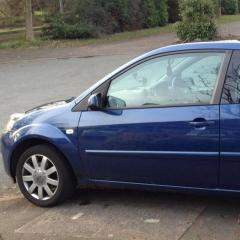
I'm Kev, got 2 Fiestas at home. 

Mine is an 07 mk6.5 silver edition and the missus has a 59 plate mk7 titanium. Had both from brand new and till recently have kept both pretty much as spec. 

Recently realised that I need to start looking after them both a bit better, money a bit tight and can't afford to replace either. So have decided to make the most of the mk6 at least, and add a few luxuries. I spend over 5 hours a week in it so it needs to be kept nice :) 

so far, I've replaced the rear wiper arm with a smooth wiper (Spring had gone in original) added leather gear gaiter (rubber one had split), and added steering wheel control stalk for the stereo. 

Next project is a replacement head unit, reversing camera (I know it's a small car and doesn't need it but I'm a gadget freak lol), internal led lights, and maybe an armrest.


Hi Welcome

Hello and Welcome Kevin:smile:

Welcome :smile:

Hello & welcome along to the forum

hi and welcome

Latest Deals

Ford UK Shop for genuine Ford parts & accessories

Disclaimer: As the club is an eBay Partner, The club may be compensated if you make a purchase via the club

Join the conversation

You can post now and register later. If you have an account, sign in now to post with your account.

Guest
Reply to this topic...

The "Digestive"


Background Picker
Customize Layout

Account

Navigation

Search

Search

Configure browser push notifications

Chrome (Android)
  1. Tap the lock icon next to the address bar.
  2. Tap Permissions → Notifications.
  3. Adjust your preference.
Chrome (Desktop)
  1. Click the padlock icon in the address bar.
  2. Select Site settings.
  3. Find Notifications and adjust your preference.
