
Skip to content
View in the app

A better way to browse. Learn more.

Ford Owners Club - Ford Forums

A full-screen app on your home screen with push notifications, badges and more.

To install this app on iOS and iPadOS
  1. Tap the Share icon in Safari
  2. Scroll the menu and tap Add to Home Screen.
  3. Tap Add in the top-right corner.
To install this app on Android
  1. Tap the 3-dot menu (⋮) in the top-right corner of the browser.
  2. Tap Add to Home screen or Install app.
  3. Confirm by tapping Install.


Join the Independent Ford Owners' Club

Our community has been built by enthusiasts, for enthusiasts, and proudly run by Ford owners' for over 18 years. As an independent, non-official club, everything you’ll find here, advice, support, and opinions, comes directly from members with genuine Ford ownership experience.

Join our friendly community... it's Free!


My Led Drl dipped beam doesn't seem straight.
Featured Replies

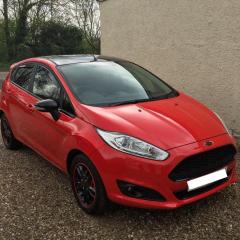
I have a 2014 plate Ford Fiesta and have recently changed the headlights from daytime running to the fancier led daytime running lights. All the bulbs seem to be working fine (they light up) but just noticed today when driving in the dark when my dipped beam on one side seems to travel a bit further than the other. So if you imagine one side the light travels 2 car lengths in front (not accurate just easy to explain) where as the other side only reaches one cars length. Is it a simple replacement bulb or is there more to it than that? Or am I missing something else? Thanks Tom

  • 3 months later...


Hi

Did you manage to sort the problem ?

Also I was looking at upgrading to led daytime running lights, was it a straight swap or did you have to change anything ?

Thanks for any replys

I would imagine it was user error and one of the bulbs was not seated correctly. The LED bulbs are a direct replacement, just search through some of the online car shops or eBay. If the car is CANbus monitored then you will need to get error free bulbs or an inline relay.


Sent from my iPad using Tapatalk

Would it not just be the beam pattern? One side travels further than the other, as far as I can tell with my own lights the left looks as though it travels further

I'm not sure the left travels further but it should shine wider if that makes sense, to put light on the curb it flicks up at the left side.


Sent from my iPad using Tapatalk

  • 2 months later...
  • Author

Jonro


only just seen this but yes it was a straight swap (assuming you haven't already done this) however getting the headlights out is a bit trickey and requires a bit of trial and error.. couple of good guides out there though... good luck!

Jonro
 
only just seen this but yes it was a straight swap (assuming you haven't already done this) however getting the headlights out is a bit trickey and requires a bit of trial and error.. couple of good guides out there though... good luck!


It wasn't me asking about changing them bud, it was the guy above my first comment. How did you get on with your problem, did you fix the different beam lengths?


Sent from my iPad using Tapatalk
  • Author

Oh yeah.. haha oops?


sorry about that! And yeah just wasn't sitting in properly (the headlight) it looked it but having adjusted the bottom clip it sits on everything is good now! And yes one beam does seem wider than the other  I think it was the left one? Can't remember but apparently it's supposed too... 🤔


Im currently debating weather I should get rally style mud flaps... 🤔🤔🤔

Latest Deals

Ford UK Shop for genuine Ford parts & accessories

Disclaimer: As the club is an eBay Partner, The club may be compensated if you make a purchase via the club

Join the conversation

You can post now and register later. If you have an account, sign in now to post with your account.

Guest
Reply to this topic...

The "Digestive"


Background Picker
Customize Layout

Account

Navigation

Search

Search

Configure browser push notifications

Chrome (Android)
  1. Tap the lock icon next to the address bar.
  2. Tap Permissions → Notifications.
  3. Adjust your preference.
Chrome (Desktop)
  1. Click the padlock icon in the address bar.
  2. Select Site settings.
  3. Find Notifications and adjust your preference.
