
Skip to content
View in the app

A better way to browse. Learn more.

Ford Owners Club - Ford Forums

A full-screen app on your home screen with push notifications, badges and more.

To install this app on iOS and iPadOS
  1. Tap the Share icon in Safari
  2. Scroll the menu and tap Add to Home Screen.
  3. Tap Add in the top-right corner.
To install this app on Android
  1. Tap the 3-dot menu (⋮) in the top-right corner of the browser.
  2. Tap Add to Home screen or Install app.
  3. Confirm by tapping Install.


Join the Independent Ford Owners' Club

Our community has been built by enthusiasts, for enthusiasts, and proudly run by Ford owners' for over 18 years. As an independent, non-official club, everything you’ll find here, advice, support, and opinions, comes directly from members with genuine Ford ownership experience.

Join our friendly community... it's Free!


Retrofit auto lights on a 2015 Ford Focus
Featured Replies

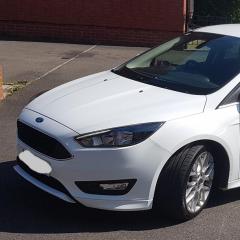
I have a 2015 Ford Focus Zetec S I have just purchased a auto headlights switch and i have the software Focccus to set it up on auto headlight and i have a black module by my rear view mirror can anybody help"

Screenshot_20170523-210301.jpg

20170523_210939.jpg


have you got rain sensor? thats what the autolights utilise

  • Author

I have a black module which is located by the rear view mirror and this is the code on it de8t-19h463-dc

thats the gps module for emergancy assistance via the sync module

  • Author

Oh right do you know the module I need and will it will it fit with it or will it replace it

not sure on your focus what the rain sensor part number is but i should be able to find out, the problem you will have though is the wiring from the bcm ( body control module ) to the sensor location in the mirror housing will be missing.

i have just guided someone on here the various stages to fit. they did post up some info on it.

@chris wayne was the person who fitted it and got it working. and on your age of focus. he may post up on here shortly hopefully.

  • Author

Thanks for your help iantt

  • 3 weeks later...

Hi Guys,

also looking to do this. I have found a sensor and switch to buy and there is a spare plug above the interior light as you can see in the pic. Can anyone confirm if this is the correct one for the rain/light sensor?IMG_0588.thumb.JPG.fab4e6ff2b65b1644476d779e20d40d4.JPG


also, is the windscreen supposed to be mottled like this or does it have to be completely clear?


IMG_0590.thumb.JPG.779ec4c39122dbe42383213aaf5d233a.JPG

wrong connector, and where  rain sensor fits should be clear to work. i had to scrape the black paint off mine

thats the connector

2017-04-04 18.30.42.jpg

Thanks for your help. Looks like that idea is out of the window then!

Where did you get the foccus software from?

6 hours ago, Dee_82 said:

CRIKEY!


But what one do you use though? :tongue:

the latest one, 0.8.6

  • 2 weeks later...

Still new to all this software stuff and turning bits on and off!

Awaiting delivery of ELM adapter and other bits and then i'll start playing :)

New to the MK3 Focus, what lead is recommended for use with the FoCCCus software?

Got all the bits apart from the wiring harness/loom which I think is going to be the most difficult to find/buy! :(


Sent from my iPhone using Tapatalk

  • 2 weeks later...

I'm struggling to find anywhere that has a titanium wiring loom :(


Do Ford sell the whole thing? Probably a silly amount of money though.


I have all the other items ready to go.

  • 2 months later...

I have the roof loom for sale if your interested as long as you don't have active city stop 

I got one of these last month and it was just plug in and go.

https://tinyurl.com/ycubkl89

  • 5 months later...
On ‎23‎/‎05‎/‎2017 at 9:59 PM, iantt said:

thats the gps module for emergancy assistance via the sync module

I'm haven trouble with my emergency assistance, its not working, is it located in the interior mirror? any help would be great thanks 

Latest Deals

Ford UK Shop for genuine Ford parts & accessories

Disclaimer: As the club is an eBay Partner, The club may be compensated if you make a purchase via the club

Join the conversation

You can post now and register later. If you have an account, sign in now to post with your account.

Guest
Reply to this topic...

The "Digestive"


Background Picker
Customize Layout

Account

Navigation

Search

Search

Configure browser push notifications

Chrome (Android)
  1. Tap the lock icon next to the address bar.
  2. Tap Permissions → Notifications.
  3. Adjust your preference.
Chrome (Desktop)
  1. Click the padlock icon in the address bar.
  2. Select Site settings.
  3. Find Notifications and adjust your preference.
