
Skip to content
View in the app

A better way to browse. Learn more.

Ford Owners Club - Ford Forums

A full-screen app on your home screen with push notifications, badges and more.

To install this app on iOS and iPadOS
  1. Tap the Share icon in Safari
  2. Scroll the menu and tap Add to Home Screen.
  3. Tap Add in the top-right corner.
To install this app on Android
  1. Tap the 3-dot menu (⋮) in the top-right corner of the browser.
  2. Tap Add to Home screen or Install app.
  3. Confirm by tapping Install.


Join the Independent Ford Owners' Club

Our community has been built by enthusiasts, for enthusiasts, and proudly run by Ford owners' for over 18 years. As an independent, non-official club, everything you’ll find here, advice, support, and opinions, comes directly from members with genuine Ford ownership experience.

Join our friendly community... it's Free!


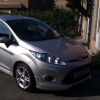
Mk7 Fiesta Drl Idea
Featured Replies

sorry if I'm being a bit thick here but are the LED foglight replacements legal because its one of the few DRL designs on offer that I like, any help clearing this up would be much appreciated :D


sorry if I'm being a bit thick here but are the LED foglight replacements legal because its one of the few DRL designs on offer that I like, any help clearing this up would be much appreciated :D

If they're being used as DRL's and come on with ignition and off with sidelights = yes

If they're being used for foglights = not legal.

If they're being used as DRL's and come on with ignition and off with sidelights = yes

If they're being used for foglights = not legal.

Ahh ok cool that clears it up lots, so i wold need to get some kind of DRL controller then, cheers nathan, still think yours are the way forward though :) might source a second hand pair of lights and split them......

  • 11 months later...

Thanks for the ideas guys. I was kind of hoping that with them being where the fogs are they would be a little more OEM looking and not cause much bother.

But then again it could be thought to be having fogs on all the time.

The only other method I can think of is modifying the indicator bulbs to LED switch back. These switch from white to flashing amber then return back to white as DRL.

Peoples thoughts on this setup?

Hi, Anyone know how this setup works? not very technical savvy although love the idea!

Hi, Anyone know how this setup works? not very technical savvy although love the idea!

It is a very good setup displayed here; LED bulbs as the indicators which double up as white DRL, wiring gubbins which control everything and a lot of patience by the looks of things!

I considered doing something like the LED strip on my old Fiesta Titanium like the new facelift version and bought all the parts I needed to do it too. I also got some old headlights off the breakers to "play" with by heating them up in the oven to break the seal between the lens and the unit itself. A DRL controller is required and to comply with the EU Law, it must be able to control the coming on of the LED strip (or whatever you use for DRL) when the ignition is on and the choice of turning the DRL off when the sidelights are turned on OR dimming by a minimum of 50% and can be used as a sidelight if no separate side light is fitted. The Law also advises that the side you are indicating should dim by 50% too to assist other motorists in being able to see your indication rather than the DRL. I did complete my DRLs in the headlight but never got round to fitting the DRL controller to the car before I sold it.

It is a very good setup displayed here; LED bulbs as the indicators which double up as white DRL, wiring gubbins which control everything and a lot of patience by the looks of things!

I considered doing something like the LED strip on my old Fiesta Titanium like the new facelift version and bought all the parts I needed to do it too. I also got some old headlights off the breakers to "play" with by heating them up in the oven to break the seal between the lens and the unit itself. A DRL controller is required and to comply with the EU Law, it must be able to control the coming on of the LED strip (or whatever you use for DRL) when the ignition is on and the choice of turning the DRL off when the sidelights are turned on OR dimming by a minimum of 50% and can be used as a sidelight if no separate side light is fitted. The Law also advises that the side you are indicating should dim by 50% too to assist other motorists in being able to see your indication rather than the DRL. I did complete my DRLs in the headlight but never got round to fitting the DRL controller to the car before I sold it.

Hi, but this clearly shows that when indicating, the DRL is non showing and dims. so this wouldnt be an issue?

Hi, but this clearly shows that when indicating, the DRL is non showing and dims. so this wouldnt be an issue?

No it is only a recommendation that they should dim or extinguish completely. It all depends on the proximity to the indicator bulb; as the video shows in this case the two are combined so the DRL extinguishes before the indicator comes on

Best bet is pop to an auto electrician and see what they say, I wouldn't imagine it's stupidly difficult.

Basically you'd need it so when the power to the indicator comes through, it turns the white LED's off. You might need new bulb connections to account for the second pin.

In saying it shouldn't be stupidly difficult, it's still a custom job which brings in the odd problem with it. If you really want a DRL in the headlight housing, either go for a Halo ring which isn't difficult or just get a CREE sidlight and have that rigged up to be a DRL, they melt retina's out of most things.

My headlights that my cousin now has took me about 4 months to do and were a LOT of work. Granted a lot of the time was spent not doing them, but my God the amount of work.

I've been considering fitting some DRL's for some time now but not got round to it yet (seems the perfect time now though as the sun has finally come out....).

Saw a post from Nath a while ago which, even though they don't look quite as good as the angel eyes, still look pretty nice.

Anybody else considered this? Obviously it means actually having an Asian Grille (which luckily I have :) )

Just not too good with electrics myself

DAMN! they look good! just wish i had the Asian Grill now :/ :ph34r: <_<

DAMN! they look good! just wish i had the Asian Grill now :/ :ph34r: <_<

You'll have to buy mine :P

Saw a post from Nath a while ago which, even though they don't look quite as good as the angel eyes, still look pretty nice.

Anybody else considered this? Obviously it means actually having an Asian Grille (which luckily I have :) )

Which ones? I had 2 DRL's ;) (at different points in time!)

imag0307m.jpg

imag0310is.jpg

dscf1298f.jpgdscf0342o.jpg

You'll have to buy mine :P

You selling??

You selling??

I am indeed, haven't painted it or anything, it's as they come.

Can you DM me a Price?

Which ones? I had 2 DRL's ;) (at different points in time!)

imag0307m.jpg

imag0310is.jpg

dscf1298f.jpgdscf0342o.jpg

I meant the first picture - if I could do I would give the halo rings a go but doubt that would go well!

Did they sit quite flush within the grill or did you have to do a few mods to get them to fit in?

Bit fiddly to get them to sit right. Dad fabricated a metal bracket in the end to bolt them to.

  • 4 weeks later...

Nathan,

What size/diameter halo ring did you use?

100mm

  • 1 month later...

Latest Deals

Ford UK Shop for genuine Ford parts & accessories

Disclaimer: As the club is an eBay Partner, The club may be compensated if you make a purchase via the club

Join the conversation

You can post now and register later. If you have an account, sign in now to post with your account.

Guest
Reply to this topic...

The "Digestive"


Background Picker
Customize Layout

Account

Navigation

Search

Search

Configure browser push notifications

Chrome (Android)
  1. Tap the lock icon next to the address bar.
  2. Tap Permissions → Notifications.
  3. Adjust your preference.
Chrome (Desktop)
  1. Click the padlock icon in the address bar.
  2. Select Site settings.
  3. Find Notifications and adjust your preference.
