
Skip to content
View in the app

A better way to browse. Learn more.

Ford Owners Club - Ford Forums

A full-screen app on your home screen with push notifications, badges and more.

To install this app on iOS and iPadOS
  1. Tap the Share icon in Safari
  2. Scroll the menu and tap Add to Home Screen.
  3. Tap Add in the top-right corner.
To install this app on Android
  1. Tap the 3-dot menu (⋮) in the top-right corner of the browser.
  2. Tap Add to Home screen or Install app.
  3. Confirm by tapping Install.


Join the Independent Ford Owners' Club

Our community has been built by enthusiasts, for enthusiasts, and proudly run by Ford owners' for over 18 years. As an independent, non-official club, everything you’ll find here, advice, support, and opinions, comes directly from members with genuine Ford ownership experience.

Join our friendly community... it's Free!


Day Light Running Lights
Featured Replies

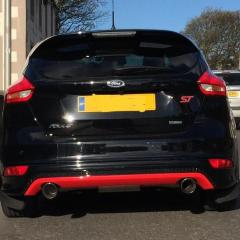
If I cant fit a new Auto switch or Zenon headlights with running lights. How do you connect after market daylight running lights so they come on with ignition? will I have to go through bulkhead. Thanks for all the info cheers jimmy :)


Someone's selling a genuine set :)

  • Author

Seen them now dinnae match my front grill anal I know lol thanks Jimmy

Sorry mate didn't realise it was the ST you had

Hi Jimmy,

Its an easy enough process, have a look at the Focus guides section, Preee did a great guide on there on how to do it, I have also put some steps down somewhere else on the boards, as a slightly different alternative, so will try and dig those out for you.

Update: Here, take a look, its without pictures, but the wording I think is fairly clear, so if you have any questions, give me a shout!

  • 1 month later...
  • Author

Hi can anyone tell me about my sat nav. I'm sure when I bought it it spoke to me? But its not working now? I can't seem to find options for selecting voice or speed camera or places to stop like services, shops, hotels. If its not on sd card cam I buy an updated sd card thanks Jimmy

Hi Jimmy,

Please make this request into a new topic so that we can keep the issues seperate.

Latest Deals

Ford UK Shop for genuine Ford parts & accessories

Disclaimer: As the club is an eBay Partner, The club may be compensated if you make a purchase via the club

Join the conversation

You can post now and register later. If you have an account, sign in now to post with your account.

Guest
Reply to this topic...

The "Digestive"


Background Picker
Customize Layout

Account

Navigation

Search

Search

Configure browser push notifications

Chrome (Android)
  1. Tap the lock icon next to the address bar.
  2. Tap Permissions → Notifications.
  3. Adjust your preference.
Chrome (Desktop)
  1. Click the padlock icon in the address bar.
  2. Select Site settings.
  3. Find Notifications and adjust your preference.
