
Skip to content
View in the app

A better way to browse. Learn more.

Ford Owners Club - Ford Forums

A full-screen app on your home screen with push notifications, badges and more.

To install this app on iOS and iPadOS
  1. Tap the Share icon in Safari
  2. Scroll the menu and tap Add to Home Screen.
  3. Tap Add in the top-right corner.
To install this app on Android
  1. Tap the 3-dot menu (⋮) in the top-right corner of the browser.
  2. Tap Add to Home screen or Install app.
  3. Confirm by tapping Install.


Join the Independent Ford Owners' Club

Our community has been built by enthusiasts, for enthusiasts, and proudly run by Ford owners' for over 18 years. As an independent, non-official club, everything you’ll find here, advice, support, and opinions, comes directly from members with genuine Ford ownership experience.

Join our friendly community... it's Free!


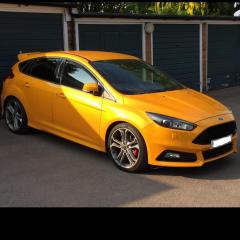
Mk3 Focus St3 Headlights Too Low
Featured Replies

Hi guys, anyone know a fix for this?

Sent from my iPhone using Ford OC


Have you changed the setting on the light control?

On my Zetec S (don't know if it's the same on the ST3)it's the centre of the headlight 'dial'. Push it to let it pop out, turn to thr setting(1-4) you want, then push it back in again.

I expect your ST3 has Xenon lamps?

Won't have a manual adjuster if that's the case.

But the headlamps will still have manual adjusting screws on the back of the units - there'll usually be 2 on each, for vertical and horizontal adjustments. Maybe looking on google or youtube will show you exactly where they are, on the mk 2 focus they light coloured heads which take a 7mm allen key and are about the width of a £1 coin.

Bit of trial and error will let you work out how they adjust then you should be able to raise your lights as needed. Would suggest you make a note of how many turns you give each in case you need to put them back. Without proper alignment kit or making marks on a wall etc I'd say just turn each side the same amount.

HID's do aim a bit low so as not to blind other drivers.

I'm having the same problem on a mk2.5 though. When mine goes for MOT I'm going to ask the tester if they can be adjusted any further upwards or if they're already at the max legal height. Don't want to guess it and go round blinding everyone lol.

As your car is newer you could probably ask Ford to check/adjust the height?

  • Author

I asked ford to sort it and they couldn't work out how to do it :(

Took 4 yrs

No adjuster for high nothing.

Sent from my iPhone using Ford OC

They have manual adjusters on the lights as Troy said... If Ford couldn't alter them maybe they are already at maximum height though.

I asked ford to sort it and they couldn't work out how to do it :(

Took 4 yrs

No adjuster for high nothing.

Hope that 4 yrs is a typo :o

The headlamps will have adjusting screws on them somewhere, even the latest cars with headlamp levelling and all sorts of other headlamp features still get manually adjusted in the factory to set the beams correctly.

Hope that 4 yrs is a typo :o

The headlamps will have adjusting screws on them somewhere, even the latest cars with headlamp levelling and all sorts of other headlamp features still get manually adjusted in the factory to set the beams correctly.

Correction, not quite manually adjusted, but automatically corrected via the manual adjusters with tooling electrically linked to the alignment facility.

On the Mk2.5 HIDs with self-levellers they still have manual adjusters. Seen here, the hex head cream plastic screw.

Mine had to be re-calibrated with the ELM cable after manually checking as the headlight module stored a fault about their lack of calibration.

IMAG4140_zpsdbd8b372.jpg

Latest Deals

Ford UK Shop for genuine Ford parts & accessories

Disclaimer: As the club is an eBay Partner, The club may be compensated if you make a purchase via the club

Join the conversation

You can post now and register later. If you have an account, sign in now to post with your account.

Guest
Reply to this topic...

The "Digestive"


Background Picker
Customize Layout

Account

Navigation

Search

Search

Configure browser push notifications

Chrome (Android)
  1. Tap the lock icon next to the address bar.
  2. Tap Permissions → Notifications.
  3. Adjust your preference.
Chrome (Desktop)
  1. Click the padlock icon in the address bar.
  2. Select Site settings.
  3. Find Notifications and adjust your preference.
