
Skip to content
View in the app

A better way to browse. Learn more.

Ford Owners Club - Ford Forums

A full-screen app on your home screen with push notifications, badges and more.

To install this app on iOS and iPadOS
  1. Tap the Share icon in Safari
  2. Scroll the menu and tap Add to Home Screen.
  3. Tap Add in the top-right corner.
To install this app on Android
  1. Tap the 3-dot menu (⋮) in the top-right corner of the browser.
  2. Tap Add to Home screen or Install app.
  3. Confirm by tapping Install.


Join the Independent Ford Owners' Club

Our community has been built by enthusiasts, for enthusiasts, and proudly run by Ford owners' for over 18 years. As an independent, non-official club, everything you’ll find here, advice, support, and opinions, comes directly from members with genuine Ford ownership experience.

Join our friendly community... it's Free!
 

Hello.

Featured Replies

Hi, name is Brad.

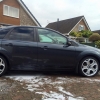
First time i've bought a ford and so far impressed with the vehicle!

Ford Focus 1.8tdci titanium:

Full heated leather,

Xenon lights (Factory fitted)

Satnav

Parking sensors... The usual stuff!

I quite enjoy keeping the car gleaming, using latest products and anything else that'll help make it easier!

If anyone knows where you can get a new Satnav aerial base (That functions with the satnav) let me know cheers! :D

I'll just finish off with a photo!

12247731_10153078579371822_6547452476829


hi and welcome

Hello and Welcome Brad :)

Hi welcome :)
  • Author

How do all!

The Ford Finis number for the Sat Nav aerial base is 1508610.

However, it's an obsolete part from Ford. You might be able to find someone who has new old stock.

The recommendation when your Ford Sat nav base fails is replace it with a windscreen mounted GPS aerial.

Ford have a GPS base replacement kit - Part No. KITAERIAL3

Which is available here:

http://www.fordpartsuk.com/shop/ford_focus_gps_aerial_upgrade_kit_2007-2011_f_KITAERIAL3_c_1301.htm

and on ebay

http://www.ebay.co.uk/itm/Genuine-Ford-Focus-GPS-Aerial-Base-Upgrade-Kit-2007-2011/311418509572?_trksid=p2047675.c100005.m1851&_trkparms=aid%3D222007%26algo%3DSIC.MBE%26ao%3D1%26asc%3D20140122125356%26meid%3Db79756baecd748c3b42e288feed8cbe0%26pid%3D100005%26rk%3D1%26rkt%3D2%26sd%3D361423990094

Very helpful GMX!:)

Welcome to the site Brad!

  • Author

Thanks, GMX, That's what I found when i was looking about a month back, just waiting to see if i see one come up on ebay or something in the future, someones bound to have one! It works fine, just the aerial has to be glued in .

Cheers, Wes.

Welcome along, where abouts in Sunny Shropshire are you from?

Hi there, welcome to the site from another Ford newbie :)

  • Author

Welcome along, where abouts in Sunny Shropshire are you from?

The not so sunny side oswestry

Latest Deals

Ford UK Shop for genuine Ford parts & accessories

Disclaimer: As the club is an eBay Partner, The club may be compensated if you make a purchase via the club

Join the conversation

You can post now and register later. If you have an account, sign in now to post with your account.

Guest
Reply to this topic...

The "Digestive"


Background Picker
Customize Layout

Account

Navigation

Search

Search

Configure browser push notifications

Chrome (Android)
  1. Tap the lock icon next to the address bar.
  2. Tap Permissions → Notifications.
  3. Adjust your preference.
Chrome (Desktop)
  1. Click the padlock icon in the address bar.
  2. Select Site settings.
  3. Find Notifications and adjust your preference.
