
Skip to content
View in the app

A better way to browse. Learn more.

Ford Owners Club - Ford Forums

A full-screen app on your home screen with push notifications, badges and more.

To install this app on iOS and iPadOS
  1. Tap the Share icon in Safari
  2. Scroll the menu and tap Add to Home Screen.
  3. Tap Add in the top-right corner.
To install this app on Android
  1. Tap the 3-dot menu (⋮) in the top-right corner of the browser.
  2. Tap Add to Home screen or Install app.
  3. Confirm by tapping Install.


Join the Independent Ford Owners' Club

Our community has been built by enthusiasts, for enthusiasts, and proudly run by Ford owners' for over 18 years. As an independent, non-official club, everything you’ll find here, advice, support, and opinions, comes directly from members with genuine Ford ownership experience.

Join our friendly community... it's Free!


Hello from Bonnie Dundee!
Featured Replies

Hi folks,

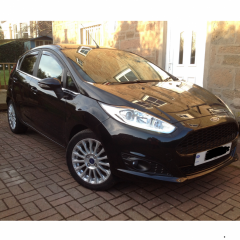
I've owned my Fiesta since new and it's now three years old (2014 Facelift model) so time to freshen it up a bit!

It's a Panther Black Titanium 1.0l Ecoboost 125PS and just passed its very first MOT with no issues.

Am now looking to personalise her a little, have recently installed front and rear dark tint ClimAir wind deflectors, just ordered the honeycombe front grille set on fordpartsuk and am looking to get the alloys power coated very soon, among one or two other mods!

Really looking forward to getting to know you all, listening to your experiences and suggestions, as well as sharing ideas and enjoying my car again.

thanks for having me 👍🏻


Hi Welcome

  • 3 months later...

Hello! Got the same car in white, haven't done anything yet but thinking about a couple of wee things here and there as well, so look forward to seeing pics if you post them :)

Guessing you've done done your front grille by now, is it easy enough? Getting rid of all the chrome is high on my list! Also thinking it needs to go a touch lower..

Latest Deals

Ford UK Shop for genuine Ford parts & accessories

Disclaimer: As the club is an eBay Partner, The club may be compensated if you make a purchase via the club

Join the conversation

You can post now and register later. If you have an account, sign in now to post with your account.

Guest
Reply to this topic...

The "Digestive"


Background Picker
Customize Layout

Account

Navigation

Search

Search

Configure browser push notifications

Chrome (Android)
  1. Tap the lock icon next to the address bar.
  2. Tap Permissions → Notifications.
  3. Adjust your preference.
Chrome (Desktop)
  1. Click the padlock icon in the address bar.
  2. Select Site settings.
  3. Find Notifications and adjust your preference.
