
Skip to content
View in the app

A better way to browse. Learn more.

Ford Owners Club - Ford Forums

A full-screen app on your home screen with push notifications, badges and more.

To install this app on iOS and iPadOS
  1. Tap the Share icon in Safari
  2. Scroll the menu and tap Add to Home Screen.
  3. Tap Add in the top-right corner.
To install this app on Android
  1. Tap the 3-dot menu (⋮) in the top-right corner of the browser.
  2. Tap Add to Home screen or Install app.
  3. Confirm by tapping Install.


Join the Independent Ford Owners' Club

Our community has been built by enthusiasts, for enthusiasts, and proudly run by Ford owners' for over 18 years. As an independent, non-official club, everything you’ll find here, advice, support, and opinions, comes directly from members with genuine Ford ownership experience.

Join our friendly community... it's Free!


Sync mouse mat?
Featured Replies

On 23/03/2018 at 10:53 AM, Rumblestrip said:

Does the navigation not use the net to determine traffic issues?

Not on Sync 2 no. Its using TMC.


On 3/20/2018 at 10:03 PM, Rumblestrip said:

Yeah I’ll take them off you. 

Where did you get these from please.

Not on Sync 2 no. Its using TMC.
What is tmc? And is this where it gets road closures etc?

Sent from my SM-G800F using Tapatalk

49 minutes ago, gillyallan said:

What is tmc? And is this where it gets road closures etc?

Sent from my SM-G800F using Tapatalk
 

https://en.wikipedia.org/wiki/Traffic_message_channel

Traffic Message Channel. The data is sent from radio stations, primarily Classic FM.

**

The INRIX[65] provides a commercial TMC service, iTMC in the United Kingdom. It is broadcast nationally on Classic FM and other commercial radio stations. The BBC charter prohibits it from carrying a commercial service. ITIS provides traffic data on RDS-TMC to major automotive companies (BMW, Mercedes, Toyota, Ford, Renault, Jaguar Land Rover and others). The price of the service is included in the price of the car or navigation system.

This system uses Floating Vehicle Data, which include positional information from over 160,000 fleet vehicles fitted. The data is complemented by journalistic or "Incident" data provided by Trafficlink. Trafficlink is owned by ITIS and provides traffic and travel bulletins to BBC Radio and to over 95% of the UK commercial radio stations. Incident data includes road works, accidents and closures.

Trafficmaster, a Teletrac Navman brand, operates a national service using local and regional radio broadcaster Global Radio to ensure reception across mainland Britain. This system uses road-side infrastructure to measure vehicle travel time between sensors placed a few miles apart, and uses number plate recognition technology. Data sources used by Teletrac Navman include Floating Vehicle data from fitted telematics devices, 8500 under-road inductance loops, over 1800 CCTV cameras, Congestion Zone charging cameras, Police control rooms plus a proprietary network of ANPR and IR sensors cameras across the road network. Teletrac Navman provide traffic data on RDS-TMC to major automotive OEM brands including VW, Audi, Skoda, Mazda, Chrysler, Honda, Seat and Vauxhall. Teletrac Navman also supply the Department for Transport with historical traffic data for modelling purposes which is used by central and local governments and their sub-contractors when analyzing road network improvement opportunities.

Both services maintain their own location tables. The current location table version of ITIS is 5.1. The current location table version of Trafficmaster is 3.1.[citation needed]

Thanks for that I hadn't known that but did wonder.

Sent from my SM-G800F using Tapatalk

3 hours ago, Evvo1234 said:

Where did you get these from please.

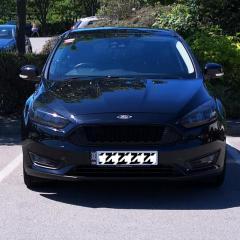
Ebay. Search for gate slot mats. £7 a set from china, choice of colours and text :)

On 3/26/2018 at 2:34 PM, Phil21185 said:

Ebay. Search for gate slot mats. £7 a set from china, choice of colours and text :)

Cheers mate thanks 

Latest Deals

Ford UK Shop for genuine Ford parts & accessories

Disclaimer: As the club is an eBay Partner, The club may be compensated if you make a purchase via the club

Join the conversation

You can post now and register later. If you have an account, sign in now to post with your account.
Note: Your post will require moderator approval before it will be visible.

Guest
Reply to this topic...

The "Digestive"


Background Picker
Customize Layout

Account

Navigation

Search

Search

Configure browser push notifications

Chrome (Android)
  1. Tap the lock icon next to the address bar.
  2. Tap Permissions → Notifications.
  3. Adjust your preference.
Chrome (Desktop)
  1. Click the padlock icon in the address bar.
  2. Select Site settings.
  3. Find Notifications and adjust your preference.
