
Skip to content
View in the app

A better way to browse. Learn more.

Ford Owners Club - Ford Forums

A full-screen app on your home screen with push notifications, badges and more.

To install this app on iOS and iPadOS
  1. Tap the Share icon in Safari
  2. Scroll the menu and tap Add to Home Screen.
  3. Tap Add in the top-right corner.
To install this app on Android
  1. Tap the 3-dot menu (⋮) in the top-right corner of the browser.
  2. Tap Add to Home screen or Install app.
  3. Confirm by tapping Install.


Join the Independent Ford Owners' Club

Our community has been built by enthusiasts, for enthusiasts, and proudly run by Ford owners' for over 18 years. As an independent, non-official club, everything you’ll find here, advice, support, and opinions, comes directly from members with genuine Ford ownership experience.

Join our friendly community... it's Free!
 

Cheaps Mods

Featured Replies

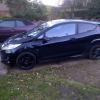
hi, basically i got my fiesta about 6 months ago and i haven't done much to it but i want to do some cheap good looking things.

here it is..

post-37237-0-87082500-1355417544_thumb.j

post-37237-0-25014900-1355417714_thumb.j

post-37237-0-14479700-1355417755_thumb.j

what's on it so far... street pack, leather, heated seats, bluetooth, push button start, voice control, mountune mp140 kit, eibach lowering springs, HID's and i think thats about it!

i want to get interior sprayed black but debating whether i'm brave enough to do it myself.

but i want some more ideas of things i can do to it.

max


Led footwell lights cheap as chips and they look good to

tint the windows?

Led brake and reverse lights, silverTec indicator bulbs, Lockwood sill protectors, DMB graphics badge overlays.

hi, basically i got my fiesta about 6 months ago and i haven't done much to it but i want to do some cheap good looking things.

here it is..

post-37237-0-87082500-1355417544_thumb.j

post-37237-0-25014900-1355417714_thumb.j

post-37237-0-14479700-1355417755_thumb.j

what's on it so far... street pack, leather, heated seats, bluetooth, push button start, voice control, mountune mp140 kit, eibach lowering springs, HID's and i think thats about it!

i want to get interior sprayed black but debating whether i'm brave enough to do it myself.

but i want some more ideas of things i can do to it.

max

Forum membership decals,

And see my list of guides below for inspiration,

Cree reverse bulb,

Cree fog bulbs to match HID

Richbrook ford reg screws

Twin boot light

Rear footwell lighting,

Glovebox light,

Carbon wrap section between rear window and boot handle.

Gloss black grills spray paint

TripleRcomposites lip kit

  • Author

thanks lenny, do you know where i could get the lip kit, and how i could do rear footwell lighting and glovebox lighting

  • Author

got window tints and my bulbs for footwell lighting came today, got blue LED bulbs i like them!

  • Author

can anyone tell me how to wire rear footwell lighting i had the front as standard but want back to but dont know how to do it

Have a look in the focus guides section or in Lenny's signature. He has written a great guide on it.

Hi mate,

Sorry for the delayed response,

The trippleRcomposites kit is hand crafted in the uk and painted prior to dispatch,

TripleRComposites advertise on their facebook page but ive purchased my front splitter from them and can now supply a direct email address

So you can contact them directly for images and pricing talk to Kevin at [email protected]

Also regarding the rear footwell lighting guide, please see the guide in the list below,

It has links to the guides and in the guides their are links to purchase the items required, will cost less than 20pounds.

And regarding the glovebox light.

Purchase a pressure switch and two 3smd led strips.

Or instead of a pressure switch you could fit a manual rocker switch.

Mount the sticky back led strips inside the glove box and fit the pressure swich to the front face so as the door pushes it down to cut the power when closed.

Then fit an inline fuse to the positive feed if splicing in to an existing power supply cable.

Or

Purchase a piggy back fuse plug and fit the cable to a permanently live fuse in the interior fuse box.

I also highly recommend Dave at autostar electonic shop on ebay.

Hes got everything you could need regarding cables,fuses,tape and switches. He also offers free no obligation advise on the correct amp of cable to wire certain things like leds in the footwells or gauges on the dash. Daves a top man and speedy dispatch.

http://stores.ebay.co.uk/AutoStar-Shop?_trksid=p2047675.l2563

  • Author

cheers for the guides! i have front footwell lighting that works with bulbs holders that i put bulbs in so do i just connect it from that?

Take a parallel tap off each light on both sides and tuck the wires up under the sides of the centre console.

Jugu be sure to pass the wires under the seat rails to avoid chopping them when moving the seats

  • Author

What do you mean by a parallel tap? And how? Sorry not very good with proper electrical language!!

Connect one wire from each of the wires to the existing bulb holders without cutting the existing wires or else you will be sharing the voltage between two bulbs and they won't light up properly.

(yes Brigante I know I did that myself, before you rub it in.)

Some people use what are called T-taps or scotchlock connectors.

  • Author

Yeah I saw they were the same as what I've seen as snap lock connectors, where you put wire in one said and the wiring your running to somewhere else in the other side of it and snap it shut? So if I put one on the positive wire and then run that to my new bulb holders that I bought for the rear and then do the same for the negative it should work?

Yes.

One live and one earth connection per light which will equate to four wires and four connectors.

  • Author

Okay, the wires going to the front working footwell lights have a purple and green wire which is ignition live and the other one is I can't remember, so snap one to purple and green wire, and onto say red wire run to New bulb holder and connect on then do same for other side! Should work?

  • Author

Done it! Sorry for all the questions! Finally Doberman passenger side was hard the wires don't let the bulb holder come down far so was a struggle

Connect one wire from each of the wires to the existing bulb holders without cutting the existing wires or else you will be sharing the voltage between two bulbs and they won't light up properly.

(yes Brigante I know I did that myself, before you rub it in.)

Lmao I've only just seen this.. What do you take me for :o :P

Lmao I've only just seen this.. What do you take me for :o :P

Just going by experience. :P

  • Author

Hi lenny my piggyback fuse and bits came, so stick my light down and the were do I connect the negative and positive wires from the light to?

Hi lenny my piggyback fuse and bits came, so stick my light down and the were do I connect the negative and positive wires from the light to?

Connect the negative to an existing negative cable or earh point,

An earth point is a ring terminal like a washer that is bolted to the body of the car with earth cables running from it.

Then connect the positive from the lights to your choice of swith.

Then run a single positive feed from the switch to your piggy back fuse.

Followed by pluging the fuse in to an ignition live source or permanent live source.

Remove the existing fuse

Insert that fuse in to the piggyback plug along with a fuse for the light

Then plug piggyback in place of fuse.

  • 3 weeks later...
  • Author

update on how i've been getting on with my mods, i've got the triple r lip kit and some i'm going to get the headlight brows, i've sprayed my interior trim around the stereo etc black and i've got rear and front footwell lights and now a glove box light, looking to do some more mods soon!

Latest Deals

Ford UK Shop for genuine Ford parts & accessories

Disclaimer: As the club is an eBay Partner, The club may be compensated if you make a purchase via the club

Join the conversation

You can post now and register later. If you have an account, sign in now to post with your account.

Guest
Reply to this topic...

The "Digestive"


Background Picker
Customize Layout

Account

Navigation

Search

Search

Configure browser push notifications

Chrome (Android)
  1. Tap the lock icon next to the address bar.
  2. Tap Permissions → Notifications.
  3. Adjust your preference.
Chrome (Desktop)
  1. Click the padlock icon in the address bar.
  2. Select Site settings.
  3. Find Notifications and adjust your preference.
