
Skip to content
View in the app

A better way to browse. Learn more.

Ford Owners Club - Ford Forums

A full-screen app on your home screen with push notifications, badges and more.

To install this app on iOS and iPadOS
  1. Tap the Share icon in Safari
  2. Scroll the menu and tap Add to Home Screen.
  3. Tap Add in the top-right corner.
To install this app on Android
  1. Tap the 3-dot menu (⋮) in the top-right corner of the browser.
  2. Tap Add to Home screen or Install app.
  3. Confirm by tapping Install.


Join the Independent Ford Owners' Club

Our community has been built by enthusiasts, for enthusiasts, and proudly run by Ford owners' for over 18 years. As an independent, non-official club, everything you’ll find here, advice, support, and opinions, comes directly from members with genuine Ford ownership experience.

Join our friendly community... it's Free!


Fiesta Reversing Camera And Screen
Featured Replies

Hello, Im a newcomer and interested in this excellent post.

I just wondered if anyone has fitted the Garmin Wireles BC30 kit which switches a Garmin Sat Nav Display onto its camera display when reverse is selected.

Looks pricey but as I have a compatible Garmin thinking of trying it but dont like the idea of fitting the camera to the number plate on the boot lid, your positions are much better but the Garmin camera does not look very adaptable.

Thanks.


  • Replies 59
  • Views 40.4k
  • Created
  • Last Reply

Top Posters In This Topic

Most Popular Posts

  • http://cgi.ebay.co.uk/ws/eBayISAPI.dll?ViewItem&item=290916053159 £9.28 delivered http://www.amazon.co.uk/dp/B006MPRFJQ/ref=pe_385721_37038051_pe_217191_31005151_M3T1_dp_1 £15.48 delivered. An

  • So i bought a camera and monitor at a cost of £19 and followed brownmotoring's guide with a couple of tweaks and thought i would post the results to help others. I found there was no need in taki

  • Here's a shot of the monitor in the car - it fits perfectly into that little cubby-hole aperture.

Posted Images

Mine is the ford one which is under the boot chrome lip where you open the boot and in rear-view-mirror.

It was on the car when i had it,aint the ford ones a lot just for the camera.

Had a new one fitted free as it was playing up,would of been £200 just for camera,wish i had a

link to the genuine ford ones so i could look at it myself but cant find one.

Good thing.

I looked into this Graeme because the higher camera positioning will give a more useful view than the black bumper position. Two snags. Finding a replacement lamp that included a camera was difficult, and if found the wiring would be a right pain.

Wires would have to be threaded through the rubber loom tubes that bridge the top of the tailgate with the car body. Then one of those wires has to connect to the reversing lamp and the other has to end up at the instrument panel. Not easy.

Fitting the camera into the bumper makes the wiring so much easier.

Very interesting point this, I want to fit the Garmin BC30 but probably have to give up.

1) the Fiesta number plate (best position for camera if using Garmin main recommendation) means getting a wire from the reversing light up into the hatch top through the tubing etc as you said.

Would be preferable as only a small hole would be need behind the plate for the camera wire and the rest straightforward but the wire feed very awkward.

2) Fit the camera to the lower body, very simple job this way but means drilling holes in either the lower black body panel or higher up in the metal part.

Would the camera be effective from the low level section. Seems from the excellent advice given by you that other cameras are OK fitted here so maybe that would be the way to go in my case where I want to use the Garmin camera with my compatible Garmin sat nav mainly because there is no wiring involved through the car.

Tom before are get into it are those wires very thin, been thinking about following your guide but using the smallest wire gauge ScotchLok because I have nowhere to use mains supply outside for my solder iron?

Thanks

  • 11 months later...

Im gonna for one one these soon thanks for the great guide and info guys. :thumbsup:.

Has anyone got a rear view mirror monitor and are they any good?

I was thinking of getting one so it fits with the car more rather than having another screen in the car.

Also does anyone have any recommendations on which camera to use?

It's been a few years since this started so there may be a better option now.

Thanks

So i bought a camera and monitor at a cost of £19 and followed brownmotoring's guide with a couple of tweaks and thought i would post the results to help others.

I found there was no need in taking the rear light off as you can just unclip the connector if you unscrew and pull off the trim near the light and take out the side carpet thing or whatever it is haha.

The cable setup was the same,  red to the blue reversing cable and black to the purple and black earth cable as shown.  The white tape is where the soldered connections are the black tape was already the where the cable splits to another block so you'll have to take some off.

IMG_1462.JPGIMG_1464.JPG


I ran the cables as the guide says but went all the way down under the scuff plates, behind the glove box (cable tired) and with a little 4mm hole drilled in the front of the compartment the screen sits and it prised away a little you can thread the cables through so you don't see any cables at all. (i forgot to take pictures of that but it's only half a hole so you don't even notice when the screens out). 


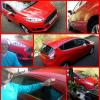
These are the finished shots.  I'm spraying the front and back bumper black as i'm not really a fan of the grey bumper, if not i'll just unscrew the top off the camera and paint it grey.


IMG_1468.JPG

IMG_1471.JPGIMG_1472.JPG


Here's the links to the camera and screen i used.  The camera comes with a hole saw and a mounting bracket as well if you want to do it another way so you have all the stuff you need other than a drill, tape, a soldering iron, copex and cable ties :smile:

https://www.amazon.co.uk/gp/product/B01EHT2MWI/ref=oh_aui_detailpage_o00_s00?ie=UTF8&psc=1

https://www.amazon.co.uk/gp/product/B013AUMTBO/ref=oh_aui_detailpage_o00_s00?ie=UTF8&psc=1

i'm very happy with it for the price, thanks for the guide brownmotoring :thumbsup:


13 hours ago, Baggi0 said:

So i bought a camera and monitor at a cost of £19 and followed brownmotoring's guide with a couple of tweaks and thought i would post the results to help others.

I found there was no need in taking the rear light off as you can just unclip the connector if you unscrew and pull off the trim near the light and take out the side carpet thing or whatever it is haha.

The cable setup was the same,  red to the blue reversing cable and black to the purple and black earth cable as shown.  The white tape is where the soldered connections are the black tape was already the where the cable splits to another block so you'll have to take some off.

IMG_1462.JPGIMG_1464.JPG


I ran the cables as the guide says but went all the way down under the scuff plates, behind the glove box (cable tired) and with a little 4mm hole drilled in the front of the compartment the screen sits and it prised away a little you can thread the cables through so you don't see any cables at all. (i forgot to take pictures of that but it's only half a hole so you don't even notice when the screens out). 


These are the finished shots.  I'm spraying the front and back bumper black as i'm not really a fan of the grey bumper, if not i'll just unscrew the top off the camera and paint it grey.


IMG_1468.JPG

IMG_1471.JPGIMG_1472.JPG


Here's the links to the camera and screen i used.  The camera comes with a hole saw and a mounting bracket as well if you want to do it another way so you have all the stuff you need other than a drill, tape, a soldering iron, copex and cable ties :smile:

https://www.amazon.co.uk/gp/product/B01EHT2MWI/ref=oh_aui_detailpage_o00_s00?ie=UTF8&psc=1

https://www.amazon.co.uk/gp/product/B013AUMTBO/ref=oh_aui_detailpage_o00_s00?ie=UTF8&psc=1

i'm very happy with it for the price, thanks for the guide brownmotoring :thumbsup:


I got to say that's good,if i didn't have one in my mirror this would be the one i would try,looks spot on.


On 8/19/2016 at 0:07 PM, jace1969 said:

I got to say that's good,if i didn't have one in my mirror this would be the one i would try,looks spot on.


Thanks :smile:

I was thinking of getting of getting one for the mirror but most were clip on ones and were quite big.  The reviews weren't very good on them either.

If i could have got a proper Ford one i'd have gone that route tbh but i couldn't.

I'm more than happy with the final results of this though.

Mine is the ford one as it was fitted from new when the other person had the car but i like that one with the screen.

  • 5 years later...
On 8/6/2013 at 10:13 PM, tomroscoe said:

Neat installation. I followed your links and was a bit confused as to which Model I preferred !  😋

Latest Deals

Ford UK Shop for genuine Ford parts & accessories

Disclaimer: As the club is an eBay Partner, The club may be compensated if you make a purchase via the club

Join the conversation

You can post now and register later. If you have an account, sign in now to post with your account.

Guest
Reply to this topic...

The "Digestive"


Background Picker
Customize Layout

Account

Navigation

Search

Search

Configure browser push notifications

Chrome (Android)
  1. Tap the lock icon next to the address bar.
  2. Tap Permissions → Notifications.
  3. Adjust your preference.
Chrome (Desktop)
  1. Click the padlock icon in the address bar.
  2. Select Site settings.
  3. Find Notifications and adjust your preference.
