
Skip to content
View in the app

A better way to browse. Learn more.

Ford Owners Club - Ford Forums

A full-screen app on your home screen with push notifications, badges and more.

To install this app on iOS and iPadOS
  1. Tap the Share icon in Safari
  2. Scroll the menu and tap Add to Home Screen.
  3. Tap Add in the top-right corner.
To install this app on Android
  1. Tap the 3-dot menu (⋮) in the top-right corner of the browser.
  2. Tap Add to Home screen or Install app.
  3. Confirm by tapping Install.


Join the Independent Ford Owners' Club

Our community has been built by enthusiasts, for enthusiasts, and proudly run by Ford owners' for over 18 years. As an independent, non-official club, everything you’ll find here, advice, support, and opinions, comes directly from members with genuine Ford ownership experience.

Join our friendly community... it's Free!


Been customising my focus
Featured Replies

Hey guys, been slowly changing my focus from standard to custom, making it a unique car I'm calling "Ghia Black" 😂

Just would like opinions/suggestions to improve 😊

Painted the standard Ghia wheels black, changed stereo.

does anyone know a decent place to get badges? I want to add the text "Black" to the tailgate under the word "Ghia"

image.jpeg

image.jpeg


Wheels look 'too black' I'd fit the chrome ford wheel centre caps to break up the blandness.

I'd keep the black wheels but paint the calipers to add some contrast to the wheels.

That or coloured rim protector trim.

Sent from my SM-G930F

I can never understand why plain black wheels,  they just look like someone nicked the trims unless really close up :unsure: now protector trim and coloured centre caps however would break things up considerably 

  • Author

Thanks guys, will look into those :)

Sent from my iPhone using Tapatalk

There's loads you can do to customise your car... Vinyl wrap, lower springs, new heater controls... Have a browse through some of the build threads for inspiration (my Focus, Eve, has black wheels - ignore the haters!)

Search Google for "full list of lennys guides" some good stuff on there 😉

Theres also a build thread here: 


  • Author

Cheers Lenny, you've given me some ideas with your thread :)

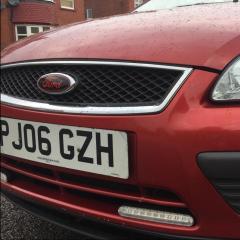
Fitted my drl today, I'll add some pics when it darkens a bit outside so you can see them better.

Sent from my iPhone using Tapatalk

  • Author

531204bb9f78e219ea29785ee2bcac84.jpg

That's fitted, will post one with them working later :)

Sent from my iPhone using Tapatalk

39 minutes ago, Dave Catherall said:

531204bb9f78e219ea29785ee2bcac84.jpg

That's fitted, will post one with them working later :)

Looking good,

Do they dim automatically when you turn in parking lights ? 

If not then you will need one of these auto dimming relays to keep things road legal http://www.ebay.co.uk/itm/302011401563 

  • Author

No, no dimming lol, I don't think they're too bright.

bebd92e2e0fe6b9763f8c2caa7b74ff1.jpg

Sent from my iPhone using Tapatalk

  • Author

I've ordered a relay for them, disabled them till it arrives [emoji23]

Sent from my iPhone using Tapatalk

23 minutes ago, Dave Catherall said:

I've ordered a relay for them, disabled them till it arrives emoji23.png

Sent from my iPhone using Tapatalk

😥 this may help 


  • Author

I think that's the one I've ordered.

Sent from my iPhone using Tapatalk

  • Author

https://vimeo.com/178515335

The drls in action with the relay fitted, only took 20 mins :)@Lenny

Sent from my iPhone using Tapatalk

  • 2 weeks later...
  • Author

I'm now looking to replace the white and blue ford badges with black and red ones (ford text red) but can't find the badges anywhere!! [emoji35][emoji53]

Sent from my iPhone using Tapatalk

Those DRL's look good, was it a tricky job to wire them in?? Will probably follow a Lenny guide if he has one on DRL's.

On 20/08/2016 at 0:32 PM, Dave Catherall said:

I'm now looking to replace the white and blue ford badges with black and red ones (ford text red) but can't find the badges anywhere!! emoji35.pngemoji53.png

Sent from my iPhone using Tapatalk

One of the mods does them I  think,  @GingerFlame I'm 99% certain, but not seen him for a while he might be on holiday or something, drop him a pm :smile:

[email protected] give this chap a try very quick response on email too

9 hours ago, PaRsOnIsPhErE said:

Those DRL's look good, was it a tricky job to wire them in?? Will probably follow a Lenny guide if he has one on DRL's.


  • Author
Those DRL's look good, was it a tricky job to wire them in?? Will probably follow a Lenny guide if he has one on DRL's.

Very easy actually, the relay has + & - to battery, + & - to drls and one white wire to headlight to allow the dimming of the drls when you turn the headlights on. Took me about 20 minutes :)

Sent from my iPhone using Tapatalk

Thanks Lenny! Mk2.5 exactly what I've got as well, just need to work out which ones to get now, so many choices!

I changed the rear registration plate, inertia lights, and floor well bulbs, and also the clock and climate control leds's on my ST170 looked really good, have also seen people change the leds in electric window switches. 

Cheap and easy, saying that, im comfortable with a soldering iron.

On newer cars that report bulb failure, you probably want to get CANBUS error free bulbs.

IMAG0710.jpg

IMAG0711.jpg

  • 5 weeks later...
  • Author
On 21/08/2016 at 9:33 PM, Damien said:

[email protected] give this chap a try very quick response on email too

I got some badges from him, thanks!

Latest Deals

Ford UK Shop for genuine Ford parts & accessories

Disclaimer: As the club is an eBay Partner, The club may be compensated if you make a purchase via the club

Join the conversation

You can post now and register later. If you have an account, sign in now to post with your account.

Guest
Reply to this topic...

The "Digestive"


Background Picker
Customize Layout

Account

Navigation

Search

Search

Configure browser push notifications

Chrome (Android)
  1. Tap the lock icon next to the address bar.
  2. Tap Permissions → Notifications.
  3. Adjust your preference.
Chrome (Desktop)
  1. Click the padlock icon in the address bar.
  2. Select Site settings.
  3. Find Notifications and adjust your preference.
